<?xml version="1.0" encoding="utf-8"?><feed xmlns="http://www.w3.org/2005/Atom" ><generator uri="https://jekyllrb.com/" version="4.4.1">Jekyll</generator><link href="https://stevecorey.com/feed.xml" rel="self" type="application/atom+xml" /><link href="https://stevecorey.com/" rel="alternate" type="text/html" /><updated>2026-07-10T11:35:56+00:00</updated><id>https://stevecorey.com/feed.xml</id><title type="html">Steve Corey</title><subtitle>SharePoint and Copilot guidance for your busy career.</subtitle><entry><title type="html">Microsoft 365 Copilot Is Expensive - Here’s How to Keep Costs Under Control</title><link href="https://stevecorey.com/microsoft-365-copilot-cost-management/" rel="alternate" type="text/html" title="Microsoft 365 Copilot Is Expensive - Here’s How to Keep Costs Under Control" /><published>2026-07-08T09:00:00+00:00</published><updated>2026-07-08T09:00:00+00:00</updated><id>https://stevecorey.com/microsoft-365-copilot-cost-management</id><content type="html" xml:base="https://stevecorey.com/microsoft-365-copilot-cost-management/"><![CDATA[<p>Let’s just say it out loud: Microsoft 365 Copilot is not cheap. If you’re an IT admin or a decision-maker trying to figure out how to roll this out without blowing up your budget, you’re probably staring at your license count wondering where to even start.</p>

<p>The good news? Microsoft has actually given admins a surprisingly solid set of tools to manage costs - you just have to know where to look. Whether you’re doing a cautious pilot, rolling out to the whole org, or trying to claw back licenses from people who haven’t touched Copilot in months, there’s an option for you.</p>

<p>Let’s walk through the main ways you can control what you spend.</p>

<h2 id="start-with-whats-already-free">Start With What’s Already Free</h2>

<p>Before you spend a single dollar on Copilot licensing, it’s worth understanding what your users already have access to at no extra cost.</p>

<p><a href="https://learn.microsoft.com/en-us/copilot/overview">Microsoft 365 Copilot Chat</a> (the web-based version) is included with eligible Microsoft 365 subscriptions at no additional charge. It gives users AI-powered chat grounded in internet data, with enterprise data protection built in when they’re signed in with their work account.</p>

<p>That’s not nothing. For users who just want to ask questions, summarize web content, or draft some quick text, Copilot Chat covers a lot of ground. If someone in your org is asking “can I at least try AI before we commit?” - point them here first. It’s a great way to build enthusiasm and identify who actually wants more before you start assigning the paid licenses.</p>

<p>The paid Microsoft 365 Copilot add-on is what unlocks the full experience: Copilot embedded in Word, Excel, PowerPoint, Outlook, Teams, and more, plus work-grounded chat that draws from your organization’s Microsoft Graph data. That’s the version that costs extra. So the first question to ask is: does every user actually need that, or can some of them get by with the free tier?</p>

<h2 id="option-1-assign-licenses-strategically">Option 1: Assign Licenses Strategically</h2>

<p>The most direct cost lever is simply being intentional about who gets a paid Copilot license.</p>

<p>Microsoft 365 Copilot is an <a href="https://learn.microsoft.com/en-us/microsoft-365/copilot/microsoft-365-copilot-licensing">add-on license</a> - you’re purchasing it on top of an existing Microsoft 365 subscription. That means you’re in full control of how many you buy and who they’re assigned to. You don’t have to do an org-wide rollout on day one.</p>

<p>Start with power users. Think about the people in your org who live in Teams, who draft documents all day, who run back-to-back meetings. Those are your Copilot candidates. Roll out there first, measure the impact, and expand from there.</p>

<p>And don’t forget: you can unassign licenses too. That’s not a radical idea - it’s just good license hygiene. Someone leaves the company? Unassign. Someone got a license in a pilot and never used it? Unassign. The <a href="https://admin.microsoft.com/">Microsoft 365 admin center</a> makes this pretty straightforward under <strong>Users &gt; Active users &gt; Licenses</strong>.</p>

<h2 id="option-2-use-usage-reports-to-spot-waste">Option 2: Use Usage Reports to Spot Waste</h2>

<p>Here’s something a lot of admins overlook: Microsoft gives you detailed Copilot usage data right in the admin center, and it’s genuinely useful for cost management.</p>

<p>The <a href="https://learn.microsoft.com/en-us/microsoft-365/admin/activity-reports/microsoft-365-copilot-usage">Microsoft 365 Copilot usage report</a> shows you two important numbers for every user:</p>

<ul>
  <li><strong>Enabled users</strong> - people who have a Copilot license assigned</li>
  <li><strong>Active users</strong> - people who actually <em>used</em> Copilot during the reporting period</li>
</ul>

<p>If those two numbers are very different, that’s money sitting on the table. You can drill all the way down to the per-user level and see the last date someone interacted with Copilot in each app - Word, Excel, PowerPoint, Outlook, Teams, and more.</p>

<p>You can access this report by going to <strong>Reports &gt; Usage &gt; Microsoft 365 Copilot</strong> in the admin center. Filter by the last 30, 90, or 180 days to get a clear picture of who’s actually getting value out of the investment. Then make informed decisions about reallocating those licenses to people who will actually use them.</p>

<p>The admin center also surfaces <strong>AI-driven licensing recommendations</strong> based on Microsoft 365 app activity. Under <strong>Copilot &gt; Settings &gt; Data access &gt; Recommendations for Microsoft 365 Copilot licensing</strong>, Microsoft will suggest users who are good Copilot candidates based on how heavily they use M365 apps. That’s a smarter way to pick your next wave of license assignments than just guessing.</p>

<div class="in-post-ad">
  <p class="in-post-ad__label">Sponsor</p>
  <div class="in-post-ad__body">
    <h3 id="-sponsored-by-afi--smarter-cloud-backup--recovery">🔒 Sponsored by Afi — Smarter Cloud Backup &amp; Recovery</h3>

<p>Cloud platforms like Microsoft 365, Google Workspace, Azure, AWS, and Kubernetes are powerful — but they don’t always protect your data the way you think. Accidental deletions, ransomware, and compliance gaps can still cause serious disruptions.</p>

<p>That’s why I’ve partnered with <strong>Afi</strong>, a modern backup and recovery solution built for today’s multi-cloud environments. Afi offers full-fidelity restores, encrypted full-text search, version history, and even self-service recovery — so users can get their data back without waiting on IT.</p>

<p>Its AI-powered ransomware detection automatically triggers backups before damage is done, giving you peace of mind and keeping your business running smoothly.</p>

<p>Over 10,000 organizations trust Afi to protect their cloud data.</p>

<p><strong>Learn more at <a href="https://stevecorey.social/afi">afi.ai</a>.</strong></p>

  </div>
</div>

<h2 id="option-3-block-self-service-purchases">Option 3: Block Self-Service Purchases</h2>

<p>Here’s one that catches admins off guard: by default, users can sometimes purchase Copilot licenses on their own, without admin approval. That’s a cost control nightmare if you’re not watching for it.</p>

<p>Microsoft gives you a setting to handle this. In the <a href="https://admin.microsoft.com/">Microsoft 365 admin center</a>, go to <strong>Copilot &gt; Settings &gt; User access &gt; Microsoft 365 Copilot self-service purchases</strong>. You have three options:</p>

<ul>
  <li><strong>Allow</strong> - users can buy licenses on their own</li>
  <li><strong>Allow trials only</strong> - users can try Copilot free, but can’t purchase (and the trial doesn’t auto-convert to a paid sub)</li>
  <li><strong>Do not allow</strong> - no self-service purchasing at all</li>
</ul>

<p>If budget control is a priority, set this to <strong>Do not allow</strong> or <strong>Allow trials only</strong>. The trials-only setting is actually a nice middle ground - it lets employees explore Copilot and build that internal demand, but keeps the actual purchasing decision centralized.</p>

<p>You can also manage self-service settings for all Microsoft products at once under <strong>Settings &gt; Org settings &gt; Self-service trials and purchases</strong>.</p>

<h2 id="option-4-pay-as-you-go-billing-for-more-flexibility">Option 4: Pay-as-You-Go Billing for More Flexibility</h2>

<p>If the all-or-nothing nature of user licenses feels too rigid, Microsoft now offers a <a href="https://learn.microsoft.com/en-us/microsoft-365/copilot/pay-as-you-go/overview">pay-as-you-go model</a> for certain Copilot services. Currently, this covers:</p>

<ul>
  <li><strong>Microsoft 365 Copilot Chat</strong> (work-based)</li>
  <li><strong>SharePoint agents</strong></li>
  <li><strong>Microsoft Copilot Retrieval API</strong> (preview)</li>
</ul>

<p>With pay-as-you-go, you connect an Azure subscription to a billing policy and users are charged based on actual consumption instead of a flat per-user monthly seat. It’s designed for scenarios where usage is unpredictable or you want to test adoption patterns before committing to prepaid licenses.</p>

<p>As an admin, you can set up billing policies that link specific groups of users to cost centers - useful if you need to track Copilot spend by department. You can also configure <strong>budget limits</strong> on those billing policies and get email notifications when you hit percentage milestones. So if your IT department’s Copilot usage is creeping toward its monthly cap, you’ll know before you blow past it.</p>

<p>Pay-as-you-go is managed in the admin center under <strong>Copilot &gt; Settings &gt; User access &gt; Copilot pay-as-you-go billing</strong>, and costs flow through Azure Cost Management for detailed analysis.</p>

<p>This model is still evolving - Microsoft has been steadily expanding which services support metered billing - so it’s worth keeping an eye on as the feature set grows.</p>

<h2 id="option-5-the-copilot-dashboard-for-deeper-insights">Option 5: The Copilot Dashboard for Deeper Insights</h2>

<p>If you really want to get serious about understanding Copilot’s return on investment, the <a href="https://learn.microsoft.com/en-us/viva/insights/org-team-insights/copilot-dashboard">Copilot Dashboard in Viva Insights</a> is worth exploring. It gives your IT leaders and executives a richer view of Copilot readiness, adoption trends, and business impact - things the standard usage report doesn’t surface.</p>

<p>This isn’t strictly a cost control tool, but understanding <em>impact</em> helps you make smarter decisions about <em>investment</em>. If certain teams are getting high value out of Copilot and others aren’t using it, that’s exactly the kind of intelligence you need to reallocate licenses effectively.</p>

<h2 id="putting-it-all-together">Putting It All Together</h2>

<p>Here’s the honest reality: Microsoft 365 Copilot can absolutely be worth the investment - but only if it’s deployed thoughtfully. Handing a license to every employee on day one and hoping for the best is the fastest way to end up with a big bill and a lot of shrugging when leadership asks what they got for it.</p>

<p>The smarter play is to:</p>

<ol>
  <li><strong>Start with the free Copilot Chat tier</strong> to build interest and identify early adopters</li>
  <li><strong>Assign paid licenses selectively</strong> to your highest-value users first</li>
  <li><strong>Watch the usage reports</strong> and reclaim licenses from people who aren’t engaging</li>
  <li><strong>Lock down self-service purchases</strong> so costs stay centralized</li>
  <li><strong>Consider pay-as-you-go</strong> for scenarios where flat-rate seats don’t make sense</li>
  <li><strong>Use the Copilot Dashboard</strong> to tell a story about ROI to your leadership</li>
</ol>

<p>None of this is rocket science, but it does take some intentional admin work. The tools are all there - Microsoft has made that part pretty easy. The harder part is building a rollout strategy that ties usage to actual business value.</p>

<p>What does your current Copilot strategy look like? Are you doing a controlled rollout, or did someone just flip the switch for everyone and hope for the best? I’d love to hear how your organization is thinking about this one.</p>]]></content><author><name>Steve Corey</name></author><category term="Microsoft 365" /><category term="Copilot" /><category term="Microsoft 365" /><category term="Licensing" /><category term="Admin" /><summary type="html"><![CDATA[Let’s just say it out loud: Microsoft 365 Copilot is not cheap. If you’re an IT admin or a decision-maker trying to figure out how to roll this out without blowing up your budget, you’re probably staring at your license count wondering where to even start.]]></summary><media:thumbnail xmlns:media="http://search.yahoo.com/mrss/" url="https://stevecorey.com/assets/images/2026/07/microsoft-365-copilot-cost-management.png" /><media:content medium="image" url="https://stevecorey.com/assets/images/2026/07/microsoft-365-copilot-cost-management.png" xmlns:media="http://search.yahoo.com/mrss/" /></entry><entry><title type="html">Microsoft Build 2026: What Actually Matters for Copilot and Agent Builders</title><link href="https://stevecorey.com/microsoft-build-2026-copilot-news/" rel="alternate" type="text/html" title="Microsoft Build 2026: What Actually Matters for Copilot and Agent Builders" /><published>2026-06-24T09:00:00+00:00</published><updated>2026-06-24T09:00:00+00:00</updated><id>https://stevecorey.com/microsoft-build-2026-copilot-news</id><content type="html" xml:base="https://stevecorey.com/microsoft-build-2026-copilot-news/"><![CDATA[<h1 id="microsoft-build-2026-what-actually-matters-for-copilot-and-agent-builders">Microsoft Build 2026: What Actually Matters for Copilot and Agent Builders</h1>

<p>By Steve Corey · Microsoft MVP · Updated June 2026</p>

<p>Microsoft Build 2026 just wrapped up, and if you watched the keynote, you probably have a list of announcements that are either exciting, confusing, or both. So let me cut through the noise and break down the things that are actually going to affect you - whether you’re using Copilot day-to-day or you’re building agents in this environment.</p>

<p>There’s a lot here. Let’s get into it.</p>

<hr />

<h2 id="what-are-microsoft-autopilot-agents-and-how-do-they-work">What Are Microsoft Autopilot Agents and How Do They Work?</h2>

<p>Let me lead with what I think is the most significant announcement from the whole keynote: <strong>Autopilot agents</strong>.</p>

<p>Autopilots are a new category of always-on agent that work autonomously, with their own identity, on your behalf. They stay running in the background, watching for events, and when something happens that they’re configured to care about - they act. No prompt required. That’s a real shift from how most Copilot experiences work today, where you have to initiate every single interaction.</p>

<p>And Microsoft didn’t just announce the concept. They shipped their own. <strong>Microsoft Scout</strong> is the first Autopilot agent, and it’s integrated across Microsoft 365 - Teams, Outlook, OneDrive, SharePoint. You can give Scout skills, connectors, and MCP servers. It’s a full-blown agent with its own name and personality, not just a glorified macro.</p>

<p>Now, before you get too excited - this is not something you’re going to download and run this afternoon. Scout currently requires:</p>

<ul>
  <li>Enrollment in Microsoft’s Frontier program</li>
  <li>An Intune policy to enable it on devices</li>
  <li>Opt-in attestation</li>
  <li>A GitHub Copilot license</li>
</ul>

<p>There are administrator steps involved at every level. Microsoft is being intentional about the rollout, and I think that’s actually the right call here.</p>

<h3 id="what-is-openclaw-and-why-is-microsoft-using-it">What Is OpenClaw and Why Is Microsoft Using It?</h3>

<p>Autopilots are built on OpenClaw, an open-source agent framework (currently in alpha for Windows on GitHub). If you’ve seen the horror stories about AI agents going rogue and deleting files - that’s the kind of thing OpenClaw has gotten a reputation for in unguarded environments.</p>

<p>Microsoft is not shipping unguarded OpenClaw. This is enterprise-grade, with guardrails at every layer. And a big part of that is the other announcement that pairs with Autopilots…</p>

<h3 id="are-microsoft-execution-containers-what-make-autopilots-safe-to-use">Are Microsoft Execution Containers What Make Autopilots Safe to Use?</h3>

<p>Microsoft Execution Containers - or MXC - are essentially micro-VMs that OpenClaw agents run inside of. The container is monitored by security tools. The agent can do its work, but it’s isolated from doing anything destructive to your physical machines or broader environment.</p>

<p>This is the piece that makes Autopilots actually viable in an enterprise context. Without something like MXC, letting an always-on autonomous agent loose on your tenant is a scary proposition. With it, you have a meaningful security perimeter around what these things can touch.</p>

<p>I think the combination of Autopilots + MXC is genuinely exciting. Easy to create (probably through something like Agent Builder), but - and I’ll be honest here - difficult to run at high performance without good agent instructions. The technical bar for building one is coming down. The bar for building one that performs well is not.</p>

<hr />

<h2 id="what-is-web-iq-and-how-does-it-fix-copilot-web-grounding">What Is Web IQ and How Does It Fix Copilot Web Grounding?</h2>

<p>Here’s a problem that anyone building Copilot agents for real-world use has bumped into: web grounding with the Bing search API kind of stinks.</p>

<p>The reason is structural. Traditional Bing search is keyword-based. So what would happen is the LLM would generate a set of keywords, Bing would search on those, and the results would come back. If the agent picked the wrong keywords - and they often do - the wrong results come back, and the agent either hallucinates to fill the gap or gives you a garbage answer.</p>

<p><strong>Web IQ is built to fix that at the architecture level.</strong></p>

<p>This is not just a new MCP server you plug in (unlike Work IQ, which is exposed as an MCP). Web IQ is a complete rebuild - indexing, retrieval, ranking, passage selection, and orchestration - all redesigned for inference-time grounding rather than traditional human search. It operates at the passage level, which means it’s pulling in concentrated, relevant signal rather than entire web pages. That lowers cost per API call and supports tighter reasoning.</p>

<p>It also covers images, not just text content from websites. That’s a meaningful expansion.</p>

<p>The part that stands out to me: the same APIs already power web grounding for Microsoft Copilot and ChatGPT. So this isn’t vaporware - it’s infrastructure that’s been running at scale.</p>

<p>Right now it’s in limited access for select Azure customers. I’ve linked to the signup in the description if you want to try for early access. But I’ll say this: I think Web IQ is eventually going to replace the regular web grounding toggle we have in Agent Builder. The old Bing search API feature will just quietly go away. That’s my prediction.</p>

<hr />

<h2 id="what-is-microsoft-iq-and-do-agent-builders-actually-need-it">What Is Microsoft IQ and Do Agent Builders Actually Need It?</h2>

<p>If you’ve been building agents that need to query organizational data, you’ve probably already been dealing with the IQ stack - Work IQ for organizational activity data, Fabric IQ for business operational data, Foundry IQ for knowledge and search.</p>

<p>The problem is you’re wiring these up individually, which is tedious and creates a lot of surface area to manage.</p>

<p><strong>Microsoft IQ is the wrapper.</strong> One tool to add to your agent that unifies access to Work IQ, Fabric IQ, and Foundry IQ. Your agent gets the full picture of organizational data through a single connection.</p>

<p>I’ll be honest - it’s a wrapper around wrappers, and whether it’s as clean in practice as it sounds in a keynote is something we’ll have to see. But the concept is right. Right now the multi-IQ setup is genuinely annoying to build and maintain. If Microsoft IQ simplifies that to a single tool addition, that’s a meaningful quality-of-life improvement for agent builders.</p>

<hr />

<h2 id="why-did-microsoft-redesign-the-copilot-interface">Why Did Microsoft Redesign the Copilot Interface?</h2>

<p>If you haven’t noticed the Copilot interface looking different lately, you will very soon - it’s been rolling out over the last week or two and this is the new normal.</p>

<p>The most user-impactful change is the prompt box. It now auto-expands upward so you can see your entire prompt as you write it. That sounds small, but if you’ve ever been writing a detailed agent prompt in a cramped little text box, you know how frustrating that was. This fixes it.</p>

<p>Beyond that it’s a more modern, streamlined look overall. But the bigger story is what Microsoft said about it: this is going to be the <strong>unifying application for all Copilot experiences</strong>. That’s a hint worth paying attention to. The new interface isn’t just cosmetic - it’s the foundation for where Copilot is heading.</p>

<p>And given that Autopilots are coming, having a unified interface that can surface and manage always-on agents makes a lot of sense.</p>

<hr />

<h2 id="is-the-agent-365-sdk-finally-generally-available">Is the Agent 365 SDK Finally Generally Available?</h2>

<p>Shorter note on this one: the Agent 365 SDK hit general availability.</p>

<p>The main use case here is bringing agents from outside the Microsoft ecosystem - Google Cloud, Amazon Bedrock, wherever - into the M365 environment so they can be monitored and managed through Agent 365. If you have agents running in non-Microsoft infrastructure that you want visibility on through the M365 admin layer, the SDK is now production-ready.</p>

<p>I’ll be honest - I’m hoping for more Agent 365 news to drop later in the week. Not everything makes the keynote, and there’s usually a lot that comes out in the days after Build. I’ll have a full roundup at the end of the week in my Insights newsletter (link in the description) if you want a complete picture.</p>

<hr />

<h2 id="which-microsoft-build-2026-announcement-should-you-actually-care-about">Which Microsoft Build 2026 Announcement Should You Actually Care About?</h2>

<p>Here’s how I’d rank these by impact on your day-to-day:</p>

<p><strong>Biggest deal:</strong> Autopilot agents and Scout. This is a new category of agent, not just a feature update. It’s going to take time to get access and longer to build well, but it’s the direction everything is heading.</p>

<p><strong>Most immediately useful for builders:</strong> Web IQ. If you’re doing any web grounding right now, this is worth getting into early access as soon as possible.</p>

<p><strong>Useful cleanup:</strong> Microsoft IQ. Not glamorous, but simplifying the multi-IQ data access story is genuinely helpful.</p>

<p><strong>Watch this space:</strong> The new Copilot UI. The cosmetic changes are nice, but the “unified experience” angle is the thing to track.</p>

<hr />

<h2 id="where-can-you-find-ready-to-deploy-copilot-agents">Where Can You Find Ready-to-Deploy Copilot Agents?</h2>

<p>If you’re actively building in the Copilot environment and want production-ready agents you can deploy right now - without starting from scratch - check out <strong>The Agent Collection</strong>.</p>

<p>It’s a curated set of Copilot agents I’ve built and maintain, designed for real business use cases. Skip the “build it from scratch” phase and start with something that already works.</p>

<p><a href="https://www.modernworkmastery.com/pages/the-agent-collection">Check out The Agent Collection →</a></p>

<p>And if you want to talk through your specific situation - what agents make sense for your environment, what to build first - reach out directly. Happy to help you think it through.</p>

<hr />

<p><em>Want a weekly roundup of the Microsoft AI news that actually matters? The Insights Newsletter goes out once a week. Link in the description.</em></p>

<hr />

<p><strong>Thumbnail suggestion:</strong> Side-by-side of the Microsoft Scout logo and the new Copilot interface, with bold text overlay reading “Build 2026: What Actually Matters.” Blue/purple tones, Steve’s logo bottom-right corner.</p>

<p><strong>Primary SEO keyword:</strong> “Microsoft Build 2026 Copilot” — appears in the title, first paragraph, and multiple H2s.
<strong>Secondary keywords used naturally:</strong> “Copilot agents,” “Web IQ,” “Microsoft Scout,” “Autopilot agent,” “Agent 365 SDK”</p>]]></content><author><name>Steve Corey</name></author><category term="3rd Party Integrations" /><category term="Agent 365" /><category term="Copilot Agents" /><category term="Copilot and AI" /><category term="News" /><category term="Agent 365" /><category term="Copilot" /><category term="Copilot Agents" /><category term="M365 Agents SDK" /><category term="Microsoft Copilot" /><category term="Microsoft Scout" /><category term="News" /><summary type="html"><![CDATA[Microsoft Build 2026: What Actually Matters for Copilot and Agent Builders]]></summary><media:thumbnail xmlns:media="http://search.yahoo.com/mrss/" url="https://stevecorey.com/assets/images/2026/06/Build-2026-What-Actually-Matters.png" /><media:content medium="image" url="https://stevecorey.com/assets/images/2026/06/Build-2026-What-Actually-Matters.png" xmlns:media="http://search.yahoo.com/mrss/" /></entry><entry><title type="html">Microsoft 365 Agents SDK vs Teams SDK vs Agent 365 SDK: Which One Do You Actually Need?</title><link href="https://stevecorey.com/microsoft-365-agents-sdk-vs-teams-sdk-vs-agent-365-sdk-which-one-do-you-actually-need/" rel="alternate" type="text/html" title="Microsoft 365 Agents SDK vs Teams SDK vs Agent 365 SDK: Which One Do You Actually Need?" /><published>2026-06-11T07:57:42+00:00</published><updated>2026-06-11T07:57:42+00:00</updated><id>https://stevecorey.com/microsoft-365-agents-sdk-vs-teams-sdk-vs-agent-365-sdk-which-one-do-you-actually-need</id><content type="html" xml:base="https://stevecorey.com/microsoft-365-agents-sdk-vs-teams-sdk-vs-agent-365-sdk-which-one-do-you-actually-need/"><![CDATA[<p>Picture this. You’ve decided to build a Copilot agent - real code, real logic, not just a Copilot Studio click-through. You open a browser, type “which SDK should I use,” and thirty seconds later you’re staring at three different options with names so similar they might as well be the same thing. Microsoft 365 Agents SDK. Teams SDK. Agent 365 SDK.</p>

<p>You close the tab. You open it again. You wonder if maybe just using Copilot Studio wasn’t such a bad idea after all.</p>

<p>If that sounds familiar, this post is for you. These three SDKs are genuinely different tools that do genuinely different things - and once you understand what each one is actually for, the choice gets a lot simpler. Let me walk you through it.</p>

<hr />

<h2 id="the-naming-problem-nobody-talks-about">The Naming Problem Nobody Talks About</h2>

<p>Before we get into the SDKs themselves, I have to say something: Microsoft named these things in the most confusing way possible, and I think it’s worth acknowledging that out loud.</p>

<p><strong>Agent 365 SDK</strong> sounds like it might be related to <strong>Microsoft 365 Agents SDK</strong>. The Teams SDK used to be called the Teams AI Library. The M365 Agents SDK toolkit used to live inside the Teams Toolkit. It’s a lot.</p>

<p>The good news is that underneath all the naming chaos, there’s actually a clean mental model here. Think of it this way:</p>

<ul>
  <li>The <strong>Microsoft 365 Agents SDK</strong> is the <em>channel layer</em> - it handles how your agent talks to platforms.</li>
  <li>The <strong>Teams SDK</strong> is the <em>Teams specialist</em> - it’s a purpose-built framework for agents that live in Teams.</li>
  <li>The <strong>Agent 365 SDK</strong> is the <em>enterprise layer</em> - it’s what you bolt on when you need identity, compliance, and governed access to M365 data.</li>
</ul>

<p>They’re not competing options. Two of them are actually complementary. Let me explain.</p>

<hr />

<h2 id="microsoft-365-agents-sdk-the-multichannel-backbone">Microsoft 365 Agents SDK: The Multichannel Backbone</h2>

<p>The Microsoft 365 Agents SDK is what you use when you want to build a custom engine agent that works <em>beyond</em> just Teams. Think of it as the plumbing. It handles the translation between your agent logic and whatever channel the user is sending messages from - Teams, Microsoft 365 Copilot, a website, Slack, Twilio, you name it.</p>

<p>Here’s what that means practically: you write your agent logic once. The SDK normalizes the incoming message into a common format, routes it to your handler, and then translates your response back into whatever format the destination channel expects. You’re not writing Teams-specific code. You’re not writing web-specific code. You’re just writing agent code.</p>

<p><strong>This is the right SDK if you need your agent in more than one place.</strong></p>

<p>The Microsoft 365 Agents SDK is also AI-agnostic by design. It doesn’t care whether you’re using Azure OpenAI, a local model, or something else entirely. It’s purely the message routing and channel abstraction layer. What you plug into it for the actual intelligence is entirely up to you.</p>

<p>Fair warning: this one has a steeper learning curve. You’re not going to get a pretty scaffold and a few config options. There’s real infrastructure involved. But it’s the recommended path for any serious enterprise agent deployment - especially if Copilot or multi-channel reach is part of your roadmap.</p>

<hr />

<h2 id="teams-sdk-when-your-agent-lives-in-teams-and-thats-enough">Teams SDK: When Your Agent Lives in Teams and That’s Enough</h2>

<p>The Teams SDK - formerly called the Teams AI Library, renamed in late 2025 to better reflect what it actually is - is what you reach for when Teams is your world and you want a clean, modern development experience specifically built for it.</p>

<p>The Teams SDK is generally available in C# and JavaScript (and in public preview for Python as of this writing). It’s purpose-built for Teams-only agents, and the tradeoff is a good one: you give up the multichannel flexibility of the M365 Agents SDK, and in exchange you get a cleaner developer experience with some built-in AI orchestration that the M365 Agents SDK doesn’t include out of the box.</p>

<p>What makes the Teams SDK interesting right now is what got added in the v2 release: <strong>MCP and A2A support.</strong></p>

<p>MCP (Model Context Protocol) lets your agent share memory and tools with other agents through a common interface. A2A (Agent-to-Agent communication) is exactly what it sounds like - secure peer-to-peer messaging between agents without relying on a centralized middleman. If you’re building in a world where agents need to coordinate, hand off tasks, or share context, these aren’t nice-to-haves. They’re the whole point.</p>

<p>So if you’re building specifically for Teams and you want a framework that thinks the same way you do about agentic workflows - without the overhead of a multichannel architecture you don’t need - the Teams SDK is a solid choice.</p>

<hr />

<div class="in-post-ad">
  <p class="in-post-ad__label">Sponsor</p>
  <div class="in-post-ad__body">
    <h3 id="-sponsored-by-afi--smarter-cloud-backup--recovery">🔒 Sponsored by Afi — Smarter Cloud Backup &amp; Recovery</h3>

<p>Cloud platforms like Microsoft 365, Google Workspace, Azure, AWS, and Kubernetes are powerful — but they don’t always protect your data the way you think. Accidental deletions, ransomware, and compliance gaps can still cause serious disruptions.</p>

<p>That’s why I’ve partnered with <strong>Afi</strong>, a modern backup and recovery solution built for today’s multi-cloud environments. Afi offers full-fidelity restores, encrypted full-text search, version history, and even self-service recovery — so users can get their data back without waiting on IT.</p>

<p>Its AI-powered ransomware detection automatically triggers backups before damage is done, giving you peace of mind and keeping your business running smoothly.</p>

<p>Over 10,000 organizations trust Afi to protect their cloud data.</p>

<p><strong>Learn more at <a href="https://stevecorey.social/afi">afi.ai</a>.</strong></p>

  </div>
</div>

<h2 id="agent-365-sdk-the-enterprise-layer-you-bolt-on-top">Agent 365 SDK: The Enterprise Layer You Bolt On Top</h2>

<p>Here’s where I see the most confusion, so let me be direct: <strong>the Agent 365 SDK is not a replacement for either of the above.</strong> It’s not a framework for building agents from scratch. It’s an extension layer you add to an agent you’ve already built - with any SDK, including non-Microsoft ones.</p>

<p>What does it give you? Four things, and they all matter for enterprise deployments:</p>

<p><strong>Entra-backed agent identity.</strong> Your agent gets its own identity - its own mailbox, its own presence - backed by Microsoft Entra. That means it can participate in M365 workloads as a first-class principal, not just a service account workaround.</p>

<p><strong>Notifications.</strong> Your agent can receive and respond to notifications from Teams, Outlook, Word comments, and emails. Like a human participant. This is a big deal for use cases where an agent needs to act on things that happen in the M365 ecosystem - not just wait to be messaged.</p>

<p><strong>Full observability.</strong> Agent 365 SDK integrates with OpenTelemetry, so you get audited, traceable logs of your agent’s interactions, inference events, and tool usage. If you’re deploying in a regulated environment, this is the difference between a proof of concept and something legal will actually sign off on.</p>

<p><strong>Governed MCP access to M365 data.</strong> Your agent can invoke MCP servers to access Mail, Calendar, SharePoint, and Teams - but under admin control, not wild-west API calls. IT can see what the agent is accessing. Admins can restrict it. That’s enterprise-grade.</p>

<p>Agent 365 hit general availability on May 1, 2026, and it’s bundled inside Microsoft 365 E7. If your org is already there, you’ve got access. If you’re building agents that will touch sensitive M365 data in a compliance-conscious environment, this is worth the conversation with your licensing team.</p>

<hr />

<h2 id="so-which-one-do-you-use">So Which One Do You Use?</h2>

<p>Here’s the honest decision tree:</p>

<p><strong>Building only for Teams?</strong> Use the Teams SDK. Cleaner, simpler, great AI orchestration primitives.</p>

<p><strong>Building for multiple channels or Copilot?</strong> Use the Microsoft 365 Agents SDK. It’s more complex, but it’s the right foundation for anything with real reach.</p>

<p><strong>Need enterprise identity, compliance, observability, or governed M365 data access?</strong> Add the Agent 365 SDK on top of whichever of the above you chose.</p>

<p>You’ll notice that last one isn’t “instead of” - it’s “on top of.” That’s the key insight. The Agent 365 SDK doesn’t replace your agent framework. It makes your agent enterprise-ready.</p>

<p>And if you’re not sure where you land yet - start with the Teams SDK, understand how agent development actually works, and then revisit the multichannel and governance questions once you know what you’re building.</p>

<hr />

<h2 id="dont-start-from-scratch">Don’t Start from Scratch</h2>

<p>One more thing before you go open seventeen documentation tabs.</p>

<p>I’ve spent a lot of time building production-ready Copilot agents, and the hardest part is almost never the SDK. It’s figuring out the patterns - what the agent should do, how it should be structured, how to make it actually useful instead of just technically functional.</p>

<p>That’s why I built <a href="https://www.modernworkmastery.com/pages/the-agent-collection">The Agent Collection</a> - a curated set of production-ready Copilot agents I’ve built and maintain. If you want to skip the “figure it out from scratch” phase and start from something that already works, that’s where to go.</p>

<p>Check it out at <a href="https://www.modernworkmastery.com/pages/the-agent-collection">modernworkmastery.com</a>.</p>

<hr />

<h2 id="faq">FAQ</h2>

<p><strong>Can I use all three SDKs together?</strong> Yes, and in an enterprise scenario you probably will. Teams SDK or M365 Agents SDK for the agent framework, Agent 365 SDK on top for identity and governance.</p>

<p><strong>Is the Teams AI Library still supported?</strong> It was renamed to the Teams SDK in late 2025. The v2 architecture is what you should be building on - if you’re on the old Teams AI Library v1, migration is worth planning for.</p>

<p><strong>Do I need Agent 365 SDK if I’m not in a regulated industry?</strong> Not necessarily. But if your agent is accessing M365 data on behalf of users, the observability and governed access are worth considering even outside heavily regulated environments. Audit logs have a way of mattering more than you expect.</p>

<p><strong>What happened to the Bot Framework SDK?</strong> The Microsoft 365 Agents SDK is the spiritual successor to the Bot Framework SDK. If you’ve got existing Bot Framework solutions, the M365 Agents SDK is where Microsoft wants you to go.</p>]]></content><author><name>Steve Corey</name></author><category term="Agent 365" /><category term="Copilot Agents" /><category term="Copilot and AI" /><category term="Agent 365" /><category term="Agent 365 SDK" /><category term="Copilot" /><category term="Copilot Agents" /><category term="Copilot API" /><category term="Copilot for SMB" /><category term="M365 Agents SDK" /><category term="Microsoft Agent 365" /><category term="Teams SDK" /><summary type="html"><![CDATA[Picture this. You’ve decided to build a Copilot agent - real code, real logic, not just a Copilot Studio click-through. You open a browser, type “which SDK should I use,” and thirty seconds later you’re staring at three different options with names so similar they might as well be the same thing. Microsoft 365 Agents SDK. Teams SDK. Agent 365 SDK.]]></summary><media:thumbnail xmlns:media="http://search.yahoo.com/mrss/" url="https://stevecorey.com/assets/images/2026/06/Copilot-SDKs.png" /><media:content medium="image" url="https://stevecorey.com/assets/images/2026/06/Copilot-SDKs.png" xmlns:media="http://search.yahoo.com/mrss/" /></entry><entry><title type="html">Microsoft Build 2026: The Copilot News That Actually Matters</title><link href="https://stevecorey.com/microsoft-build-2026-the-copilot-news-that-actually-matters/" rel="alternate" type="text/html" title="Microsoft Build 2026: The Copilot News That Actually Matters" /><published>2026-06-02T19:05:00+00:00</published><updated>2026-06-02T19:07:41+00:00</updated><id>https://stevecorey.com/microsoft-build-2026-the-copilot-news-that-actually-matters</id><content type="html" xml:base="https://stevecorey.com/microsoft-build-2026-the-copilot-news-that-actually-matters/"><![CDATA[<p>The Microsoft Build keynote just wrapped up, and as usual the keynote was a two-hour parade of announcements. Some of it was developer infrastructure that won’t touch your day-to-day. But a good chunk of it is directly relevant if you’re using Copilot or building agents in the Microsoft ecosystem.</p>

<p>So let me break down the stuff that matters - and what I actually think about it.</p>

<h2 id="web-iq-finally-web-grounding-that-doesnt-stink">Web IQ: Finally, Web Grounding That Doesn’t Stink</h2>

<p>If you’ve ever used web grounding in a Copilot agent and gotten back garbage results, congratulations - you’ve experienced the Bing keyword search problem.</p>

<p>Here’s what was happening: when your agent needed to search the web, it would generate a set of keywords and throw them at the Bing search API. That’s how Bing has always worked. Keyword-based. Traditional. And honestly, not a great fit for how AI agents actually think and ask questions. Get the keywords slightly wrong, and the search results come back completely off-base.</p>

<p><strong><a href="https://blogs.bing.com/search/June-2026/Announcing-Microsoft-Web-IQ">Web IQ</a> is Microsoft’s answer to that problem</strong> - and it’s a much bigger deal than just swapping out the search API.</p>

<p>This is a ground-up re-architecture of how search works for AI systems. It’s not just semantic search bolted on top of Bing. It’s a full AI-native grounding layer that includes an intelligence layer doing its own reasoning about <em>how</em> to search - what kind of queries to run, how deep to go, when to stop. It’s pulling in web pages, news, images, and videos. And it’s built for the kind of repeated, multi-step retrieval that agentic workflows actually require.</p>

<p>The numbers Microsoft published are notable: sub-165ms p95 latency, nearly 2.5x faster than alternatives in their testing, and better grounding satisfaction scores (they call it GDSAT - basically whether the search result actually answered what you needed, not just whether it was technically relevant).</p>

<p>Right now Web IQ is in private preview. There’s a sign-up link at <a href="https://aka.ms/WebIQ">aka.ms/WebIQ</a> if you want to get in early.</p>

<p>My take: I’d expect the regular web grounding toggle in agent builders to eventually just become Web IQ under the hood. The old Bing search API approach will probably stick around for a while and then quietly disappear. If you’re building agents that rely on web grounding today, keep an eye on this one.</p>

<h2 id="microsoft-iq-one-tool-to-rule-them-all">Microsoft IQ: One Tool to Rule Them All</h2>

<p>This one is simpler to explain, though “wrapper around wrappers” is basically what it is.</p>

<p>Right now, if you’re building an agent that needs to access organizational data, you’re picking and choosing between Work IQ (for emails, meetings, chats), Fabric IQ (for data and analytics), and Foundry IQ (for Azure AI search). You add whichever IQ layers your agent needs and wire them together.</p>

<p><strong>Microsoft IQ is a single unified tool that wraps all of those.</strong> One connection, and your agent gets access to the full range of organizational data sources.</p>

<p>Practically speaking, this should clean up a lot of the complexity in agent configuration. Instead of reasoning about which IQ layer covers which data source, you just add Microsoft IQ and let it figure out the routing. At least, that’s the idea - we’ll see how it plays out in practice.</p>

<p>Not a lot of detail released on this one yet, but the direction makes sense.</p>

<h2 id="the-new-copilot-ui-its-here-and-heres-why-its-actually-good">The New Copilot UI: It’s Here, and Here’s Why It’s Actually Good</h2>

<p>If you’ve opened Copilot in the last week or two, you’ve probably already seen this. The interface got a significant redesign and <a href="https://www.microsoft.com/en-us/microsoft-365/blog/2026/05/28/introducing-a-new-design-for-microsoft-365-copilot">Microsoft has now officially announced it</a>.</p>

<p>The headline feature for most people is going to be the prompt box. It now expands upward as you type, so you can actually see your entire prompt before you send it. Sounds small, but if you’ve ever been trying to write a multi-paragraph prompt in a tiny single-line text field, you know how big a deal this is.</p>

<p>Beyond that, Microsoft says the app loads more than twice as fast (50%+ reduction in load time in their testing), and response times for complex prompts have improved by about 10%. They’re also reporting a 27% increase in Copilot usage in Word, 33% in Excel, 43% in PowerPoint, and 30% in Outlook since rolling out the new in-app experience. Whether that’s the UI or just better AI - probably both.</p>

<p><strong>The bigger signal here is what Microsoft said about this being a “unifying application” for all Copilot experiences.</strong> That’s not throwaway marketing language. They’re building toward a single front-door for everything Copilot - chat, agents, automation - and this redesign is the foundation for that. Which brings us to the most interesting announcement of the whole keynote.</p>

<div class="in-post-ad">
  <p class="in-post-ad__label">Sponsor</p>
  <div class="in-post-ad__body">
    <h3 id="-sponsored-by-afi--smarter-cloud-backup--recovery">🔒 Sponsored by Afi — Smarter Cloud Backup &amp; Recovery</h3>

<p>Cloud platforms like Microsoft 365, Google Workspace, Azure, AWS, and Kubernetes are powerful — but they don’t always protect your data the way you think. Accidental deletions, ransomware, and compliance gaps can still cause serious disruptions.</p>

<p>That’s why I’ve partnered with <strong>Afi</strong>, a modern backup and recovery solution built for today’s multi-cloud environments. Afi offers full-fidelity restores, encrypted full-text search, version history, and even self-service recovery — so users can get their data back without waiting on IT.</p>

<p>Its AI-powered ransomware detection automatically triggers backups before damage is done, giving you peace of mind and keeping your business running smoothly.</p>

<p>Over 10,000 organizations trust Afi to protect their cloud data.</p>

<p><strong>Learn more at <a href="https://stevecorey.social/afi">afi.ai</a>.</strong></p>

  </div>
</div>

<h2 id="autopilots-and-microsoft-scout-the-always-on-agent-is-here">Autopilots and Microsoft Scout: The Always-On Agent Is Here</h2>

<p>This is the one I’ve been waiting for, and Microsoft Build 2026 is where it landed.</p>

<p><strong>Autopilots are a new category of agent</strong> - always-on, autonomous, operating with their own identity, taking action on your behalf without needing to be prompted every time. They stay running in the background, watch for events, and react to them. Think of it less like a chatbot and more like a digital coworker that never clocks out.</p>

<p>And Microsoft already built their first one. It’s called <a href="https://www.microsoft.com/en-us/microsoft-365/blog/2026/06/02/introducing-microsoft-scout-your-always-on-personal-agent/">Microsoft Scout</a>.</p>

<p>Scout is built on OpenClaw - Microsoft’s enterprise implementation of the open-source agent framework. If you’ve heard stories about OpenClaw going rogue and deleting files, take a breath. Microsoft has wrapped this thing in serious enterprise guardrails. We’re talking Entra identity for every agent action (so everything is attributable), Intune policy requirements before you can even turn it on, Microsoft Purview data protection enforcement, and scoped credentials that get redacted from logs. This is not “download and run.” There’s a real admin setup process before any of this touches your environment.</p>

<p>What does Scout actually do? Right now it’s focused on coordination work - scheduling meetings across time zones, flagging what needs your attention, blocking time on your calendar for upcoming deliverables, spotting stalled decisions before they become blockers. Over time it’s supposed to get smarter about your patterns through Work IQ, learning how you work and what actually matters to you.</p>

<p>Scout also comes with the <strong>Microsoft Execution Container</strong> - essentially a micro-VM environment where the agent’s processes run in isolation, monitored by security tooling, so it can’t interfere with other systems or do something destructive on your machines.</p>

<p><strong>Availability right now:</strong> Private preview, requires Frontier enrollment, Intune policy configuration, and an opt-in attestation. Users with a GitHub Copilot license can then download and install it. Full setup instructions are at <a href="https://learn.microsoft.com/microsoft-scout">learn.microsoft.com/microsoft-scout</a>.</p>

<p>My honest take: Scout is a real preview of where this is all going. The Autopilot framework is what makes it interesting to builders - Microsoft has essentially announced that you’ll be able to create your own autopilot agents with their own name, personality, skills, connectors, and MCP servers. The interface will probably look a lot like agent builder. Getting them to <em>run</em> well will be the hard part, same as it always is with agents. Good instructions matter. Clear scope matters. But this is a big deal.</p>

<hr />

<h2 id="agent-365-sdk-now-generally-available">Agent 365 SDK: Now Generally Available</h2>

<p>Shorter one to end on. The Agent 365 SDK has hit general availability.</p>

<p>The main use case here is bringing agents from other platforms - Google Cloud, Amazon Bedrock, wherever your organization is building - into the Microsoft 365 environment so they can be monitored and governed through Agent 365. If you’ve got agents living outside the Microsoft stack that you still need visibility into, this is how you do it.</p>

<p>Not the flashiest announcement from Build, but GA means it’s production-ready. If you’ve been waiting to start building on it, now’s a reasonable time to dig in.</p>

<h2 id="a-lot-more-is-coming">A Lot More Is Coming</h2>

<p>The keynote is never the whole picture. There’s typically a long tail of announcements that come out through the rest of the week - blog posts, deep dives, session recordings. I’ll have a full roundup in the Insights Newsletter once the dust settles. <a href="https://stevecorey.com/insights/">Subscribe here</a> if you want that delivered to your inbox.</p>

<p>And if you want to skip the “build it from scratch” phase and work with Copilot agents that are already production-ready - tested, refined, and ready to deploy in your environment - that’s exactly what I’ve put together in <strong><a href="https://www.modernworkmastery.com/pages/the-agent-collection">The Agent Collection</a></strong>. It’s a curated set of agents I’ve built and maintain, covering the scenarios I see organizations actually need. If something from Build caught your attention and you want to see what a polished version looks like in practice, start there.</p>]]></content><author><name>Steve Corey</name></author><category term="3rd Party Integrations" /><category term="Agent 365" /><category term="Copilot Agents" /><category term="Copilot and AI" /><category term="News" /><category term="Agent 365" /><category term="Copilot" /><category term="Copilot Agents" /><category term="M365 Agents SDK" /><category term="Microsoft Copilot" /><category term="News" /><summary type="html"><![CDATA[The Microsoft Build keynote just wrapped up, and as usual the keynote was a two-hour parade of announcements. Some of it was developer infrastructure that won’t touch your day-to-day. But a good chunk of it is directly relevant if you’re using Copilot or building agents in the Microsoft ecosystem.]]></summary><media:thumbnail xmlns:media="http://search.yahoo.com/mrss/" url="https://stevecorey.com/assets/images/2026/06/Build-2026-News.png" /><media:content medium="image" url="https://stevecorey.com/assets/images/2026/06/Build-2026-News.png" xmlns:media="http://search.yahoo.com/mrss/" /></entry><entry><title type="html">Microsoft Foundry Agents vs M365 Agents SDK: Why “Publish to Teams” Isn’t Enough</title><link href="https://stevecorey.com/microsoft-foundry-agents-vs-m365-agents-sdk/" rel="alternate" type="text/html" title="Microsoft Foundry Agents vs M365 Agents SDK: Why “Publish to Teams” Isn’t Enough" /><published>2026-05-20T07:41:18+00:00</published><updated>2026-05-20T07:41:28+00:00</updated><id>https://stevecorey.com/microsoft-foundry-agents-vs-m365-agents-sdk</id><content type="html" xml:base="https://stevecorey.com/microsoft-foundry-agents-vs-m365-agents-sdk/"><![CDATA[<p>Here’s a scenario I keep running into. A developer builds a solid agent in Microsoft Foundry, hits the “Publish to Teams” button, and it works. The agent shows up in Teams and in the M365 Copilot app. Users can chat with it. They demo it, everyone nods, and then someone asks: “Can it send an Adaptive Card when the approval is done?” Or: “Can it pull up an interactive form from our other system right inside the chat?” Or: “Can it proactively ping the channel when a document is flagged?”</p>

<p>And the answer, through Foundry’s built-in publish path, is no.</p>

<p><strong>That’s the ceiling.</strong> Foundry’s quick publish gets your agent into Teams and Copilot - but it’s a low-fidelity connection. It’s enough for a demo. It’s not enough for a production experience that takes full advantage of what M365 can do. The Microsoft 365 extensibility model - whether you’re building a declarative agent or a full custom engine agent with the M365 Agents SDK - is how you break through that ceiling. And most pro-code developers I talk to haven’t looked at either seriously yet.</p>

<h2 id="what-foundrys-publish-to-teams-actually-gives-you">What Foundry’s “Publish to Teams” Actually Gives You</h2>

<p>To be fair, the quick publish path in Foundry is genuinely useful. With a few clicks, your agent is reachable in Teams channels and in the M365 Copilot app. Users can chat with it. It responds. For simple conversational scenarios - internal Q&amp;A, basic lookups, lightweight automation - that might be all you need.</p>

<p>But the integration is shallow by design. What you’re getting is essentially a pass-through - user sends a message, Foundry processes it, text comes back. The connection goes through Azure Bot Service, but Foundry’s publish path only exposes a slice of what Bot Service can actually do. The rich layer that makes M365 experiences feel native is just not available through that channel:</p>

<ul>
  <li><strong>No Adaptive Cards</strong> - responses are plain text only</li>
  <li><strong>No MCP Apps</strong> UI - there’s no way to surface interactive UI from an external app inside the chat experience through Foundry’s publish path</li>
  <li><strong>No proactive messaging</strong> - the agent can only respond, it can’t initiate</li>
  <li><strong>No deep Teams-native patterns</strong> - things like task modules, message extensions, and channel-level actions are off the table</li>
</ul>

<p>This applies to both the Teams publish and the Copilot app publish. Same path, same constraints, same ceiling.</p>

<h2 id="what-the-m365-agents-sdk-unlocks">What the M365 Agents SDK Unlocks</h2>

<p>The M365 Agents SDK is the pro-code framework built specifically for agents that need to be first-class citizens inside Microsoft 365. It handles the channel plumbing - routing activities, managing state, normalizing input from different surfaces - so you can focus on the agent logic itself.</p>

<p>With it, your agent actually gets access to the full M365 integration surface:</p>

<ul>
  <li><strong>Adaptive Cards</strong> - send rich, interactive cards that users can act on directly in Teams or Copilot</li>
  <li><strong>MCP UI apps</strong> - when you build a declarative agent via the M365 Agents Toolkit and connect it to an MCP server, you can surface interactive UI from that external app directly inside the Copilot chat. Think expense approval forms, project dashboards, task managers - rendered inline, without the user ever leaving the conversation. Not available through Foundry’s publish path.</li>
  <li><strong>Proactive messaging</strong> - initiate conversations, send alerts, update users when background processes complete - without waiting for the user to ask</li>
  <li><strong>Full Teams channel presence</strong> - works in channels, group chats, 1:1 conversations, and meetings</li>
  <li><strong>M365 Copilot app integration</strong> - a genuine, deep presence in Copilot, not a pass-through</li>
  <li><strong>The Agent Store</strong> - publish your agent so it’s discoverable and managed like any other M365 app, with proper admin controls</li>
</ul>

<p>And importantly: <strong>the SDK is AI-agnostic</strong>. It handles distribution and channel management. What generates the intelligence is up to you - which means you can absolutely point it at a model you’ve deployed in Foundry. These two tools are complementary, not competing.</p>

<h2 id="what-building-with-the-m365-agents-sdk-actually-looks-like">What Building With the M365 Agents SDK Actually Looks Like</h2>

<p>This is where I think a lot of developers check out - they assume it’s going to be a complicated setup, and they default back to Foundry or Copilot Studio because it feels safer. It’s really not that bad.</p>

<p>The M365 Agents Toolkit in VS Code and Visual Studio does the heavy lifting. You scaffold a new project, pick your agent type (declarative or custom engine), and you get a working structure with local debugging built in. The toolkit also handles sideloading into Teams and the publish flow to the Admin Center when you’re ready to go wider.</p>

<p>Custom engine agents - which is the M365 Agents SDK path specifically - are where you take full control of the AI layer. You bring your own model, your own orchestration, and your own tool integrations. The SDK handles how that agent plugs into Teams channels, manages conversation state, and routes activities from whatever surface the user is on. You deploy it to an Azure App Service or container and that’s your hosting story.</p>

<p>The simplest version of this is a single component - your AI logic and your channel logic living together in the same App Service or container. You wire up your model calls, handle conversation state, and manage the M365 channel integration all in one place. One service, one deployment, done. That’s the right starting point for most teams.</p>

<p>The more complex version - and this is where Foundry enters the picture - is splitting those two concerns apart. Your AI layer runs as a Foundry hosted agent (or any other backend service), and your M365 Agents SDK component is purely the front door: it handles channel routing and hands off to Foundry for the intelligence. You’d go this route when you need what Foundry specifically offers - managed infrastructure, enterprise compliance controls, built-in tools like code interpreter or file search, or complex multi-agent orchestration that benefits from Foundry’s runtime.</p>

<p>But don’t let the two-tier architecture intimidate you out of getting started. If you don’t need all of that, a single well-structured App Service running the M365 Agents SDK with your own AI logic is completely production-worthy.</p>

<div class="in-post-ad">
  <p class="in-post-ad__label">Sponsor</p>
  <div class="in-post-ad__body">
    <h3 id="-sponsored-by-afi--smarter-cloud-backup--recovery">🔒 Sponsored by Afi — Smarter Cloud Backup &amp; Recovery</h3>

<p>Cloud platforms like Microsoft 365, Google Workspace, Azure, AWS, and Kubernetes are powerful — but they don’t always protect your data the way you think. Accidental deletions, ransomware, and compliance gaps can still cause serious disruptions.</p>

<p>That’s why I’ve partnered with <strong>Afi</strong>, a modern backup and recovery solution built for today’s multi-cloud environments. Afi offers full-fidelity restores, encrypted full-text search, version history, and even self-service recovery — so users can get their data back without waiting on IT.</p>

<p>Its AI-powered ransomware detection automatically triggers backups before damage is done, giving you peace of mind and keeping your business running smoothly.</p>

<p>Over 10,000 organizations trust Afi to protect their cloud data.</p>

<p><strong>Learn more at <a href="https://stevecorey.social/afi">afi.ai</a>.</strong></p>

  </div>
</div>

<h2 id="the-right-mental-model">The Right Mental Model</h2>

<p>Think of it in two layers.</p>

<p>The <strong>AI layer</strong> is where your model runs, where your tools are wired up, where the thinking happens. Foundry Agent Service is excellent at this - managed infrastructure, built-in tools like code interpreter and file search, persistent memory, enterprise security. If you’re doing heavy backend processing, multi-agent orchestration, or need Azure-grade compliance controls, Foundry is doing real work for you here.</p>

<p>The <strong>channel layer</strong> is how your agent talks to users inside M365 surfaces. Foundry gives you a basic channel layer for free with quick publish. The M365 Agents SDK gives you a full one - deployed as a web service in Azure, handling the rich interaction patterns your users actually expect.</p>

<p>Here’s a concrete example. Say you’re building an IT helpdesk agent. The backend logic - pulling from your ticketing system, reasoning about priority, suggesting resolutions - that could live in Foundry. But when the agent needs to send a user an Adaptive Card showing their ticket status with a “Mark Resolved” button, or proactively ping a channel when a P1 ticket goes unanswered for 30 minutes, that’s the M365 Agents SDK doing work that Foundry’s publish path simply can’t do.</p>

<p><strong>If your use case needs anything beyond simple back-and-forth text responses in Teams or Copilot, you need the channel layer that the M365 Agents SDK provides.</strong></p>

<p>The simpler path is to build it all as one component - AI logic and M365 channel handling together in a single App Service or container. That’s where most teams should start. The more advanced pattern is to separate the two: Foundry running the backend AI layer, the M365 Agents SDK component acting as the front door. You get there when you genuinely need what Foundry’s managed runtime offers - and not before.</p>

<h2 id="what-about-copilot-studio">What About Copilot Studio?</h2>

<p>I’ve been talking about pro-code options this whole article, but it’s worth a quick callout: Copilot Studio is the third lane here, and it’s the right answer for <em>some</em> teams.</p>

<p>If the built-in connectors and actions cover what you need, <strong>AND</strong> the user experience of authorizing those connections is acceptable (a BIG issue in Copilot Studio) - Copilot Studio is faster and requires far less infrastructure overhead. It also has its own publish path into Teams and Copilot that gives you a reasonable M365 presence.</p>

<p>The gap shows up when you need things Copilot Studio can’t (or can’t easily) do: custom AI models, highly tailored UI, or an ultra-seamless connection experience to your external systems. That’s when the M365 Agents SDK conversation becomes relevant. And to be honest… it shines. I actually WISH Copilot Studio could provide the smooth experience that you can get through the M365 Agents SDK and how it does OAuth behind the scenes. I doubt that’ll ever happen.</p>

<h2 id="who-should-be-looking-at-the-m365-agents-sdk">Who Should Be Looking at the M365 Agents SDK</h2>

<p>If you’re a pro-code developer building agents for M365 and you’re currently doing one of these things, this is for you:</p>

<p><strong>You’ve hit Foundry’s publish ceiling.</strong> You built something in Foundry, it’s running, but you can’t get the interaction patterns you need through the publish path. The M365 Agents SDK is the path forward - not a rebuild of your AI logic, just a proper front door into M365 for the agent you’ve already built.</p>

<p><strong>You’re defaulting to Copilot Studio for M365 integration.</strong> You know Copilot Studio isn’t really the right fit for your use case - the model limitations or connector gaps are <strong>obvious</strong> - but you’ve been using it because you assumed it was your only M365-native option. The M365 Agents SDK is the pro-code alternative Microsoft built for exactly this.</p>

<p><strong>You’re building something users will rely on daily.</strong> An IT helpdesk agent. A contract review agent. An onboarding assistant. These agents need to feel like real apps - with proper admin deployment, Adaptive Card UIs, and the ability to reach out to users rather than just respond to them. That’s not a Foundry quick-publish story.</p>

<p>The M365 Agents Toolkit makes getting started more approachable than it looks. You bring your own model and orchestration. Microsoft handles the channel infrastructure. And the output is an agent that genuinely behaves like a native M365 app - because it is one.</p>

<h2 id="the-bottom-line">The Bottom Line</h2>

<p>Foundry’s publish-to-Teams path is a good starting point - and for lightweight use cases, it might be all you need. But if you’re building something that users will rely on daily, that needs to feel like a real M365 app, and that takes advantage of the richer interaction patterns M365 supports, quick publish isn’t going to cut it.</p>

<p>The M365 Agents SDK is the pro-code answer to that problem. It’s not widely talked about, it’s not the default recommendation, and a lot of developers are building lower-fidelity agents than they need to be - simply because they don’t know this option exists.</p>

<p>Now you do.</p>

<p>If you want to see what full-fidelity, production-ready Copilot agents look like in practice, check out <a href="https://www.modernworkmastery.com/pages/the-agent-collection">The Agent Collection</a> - a set of agents I’ve built and maintain for real M365 deployments. They’re built right, and they’re ready to use. With pro-code agents coming soon!</p>

<p>And if you’re working through a specific architecture decision, reach out. This is exactly the kind of thing I love getting into.</p>]]></content><author><name>Steve Corey</name></author><category term="3rd Party Integrations" /><category term="Copilot Agents" /><category term="Copilot and AI" /><category term="Copilot" /><category term="Copilot Agents" /><category term="custom engine agent" /><category term="declarative agent" /><category term="M365 Agents SDK" /><category term="M365 Agents Toolkit" /><category term="Microsoft Copilot" /><summary type="html"><![CDATA[Here’s a scenario I keep running into. A developer builds a solid agent in Microsoft Foundry, hits the “Publish to Teams” button, and it works. The agent shows up in Teams and in the M365 Copilot app. Users can chat with it. They demo it, everyone nods, and then someone asks: “Can it send an Adaptive Card when the approval is done?” Or: “Can it pull up an interactive form from our other system right inside the chat?” Or: “Can it proactively ping the channel when a document is flagged?”]]></summary><media:thumbnail xmlns:media="http://search.yahoo.com/mrss/" url="https://stevecorey.com/assets/images/2026/05/Foundry-Agents-vs-M365-Agents-SDK-agents.png" /><media:content medium="image" url="https://stevecorey.com/assets/images/2026/05/Foundry-Agents-vs-M365-Agents-SDK-agents.png" xmlns:media="http://search.yahoo.com/mrss/" /></entry><entry><title type="html">How to Build an HR Policy Agent in Copilot Studio</title><link href="https://stevecorey.com/how-to-build-an-hr-policy-agent-in-copilot-studio/" rel="alternate" type="text/html" title="How to Build an HR Policy Agent in Copilot Studio" /><published>2026-05-06T08:11:21+00:00</published><updated>2026-05-10T11:03:21+00:00</updated><id>https://stevecorey.com/how-to-build-an-hr-policy-agent-in-copilot-studio</id><content type="html" xml:base="https://stevecorey.com/how-to-build-an-hr-policy-agent-in-copilot-studio/"><![CDATA[<p>Most Copilot agents I see built in demos look impressive for about five minutes. Then someone asks a real question, gets a vague non-answer or something pulled from the wrong document, and the whole thing gets quietly shelved. The problem <em>usually</em> isn’t the platform. Copilot Studio is somewhat decent. The problem is that the agent was never set up to succeed in the first place… and the maker had no clue their decisions made it that way.</p>

<p>Building one that actually works comes down to three things:</p>

<ul>
  <li>instructions that are specific enough to control behavior,</li>
  <li>a knowledge source that’s scoped tightly enough to be trustworthy,</li>
  <li>and a couple of settings that are wrong by default.</li>
</ul>

<p>Get those three things right and you end up with an agent that HR teams will actually rely on. Get them wrong and you’ve got an expensive magic 8-ball… or worse, a failed demo in front of a LOT of people 🤣.</p>

<p>This post walks through how I build an HR policy agent in Copilot Studio from scratch. I’ll cover the mechanics, but <strong>more importantly</strong> I’ll explain the decisions behind them, because that’s the part most tutorials skip.</p>

<h2 id="why-hr-is-a-great-first-use-case">Why HR Is a Great First Use Case</h2>

<p>If you’re trying to make the case for Copilot agents inside your organization, HR is one of the best places to start. The problem is well-defined, the pain is real, and the ROI is easy to explain to leadership.</p>

<p>HR teams spend a ton of time answering the same questions over and over - vacation accrual, PTO carryover, what counts as a qualifying life event for benefits enrollment, how the new hire onboarding process works. These aren’t hard questions by any stretch of the imagination. They’re just frequent ones. Every one of those questions takes up valuable time for an HR professional who could (and <em>should</em>) be doing something that actually requires their judgment and expertise.</p>

<p>That’s a fair statement to make, right?</p>

<p>An agent that can answer those questions instantly, accurately, and at 2am on a Sunday is a <strong>genuinely</strong> useful thing. It’s not a toy demo. And because it’s pulling from your official policy documents rather than someone’s memory or interpretation… the answers are <strong>consistent</strong> in a way that a shared inbox or a “just ask so-and-so” culture never really is. Plus, you don’t risk annoying HR with questions they already answered 20 times that day.</p>

<h2 id="getting-started-the-part-you-can-move-through-quickly">Getting Started: The Part You Can Move Through Quickly</h2>

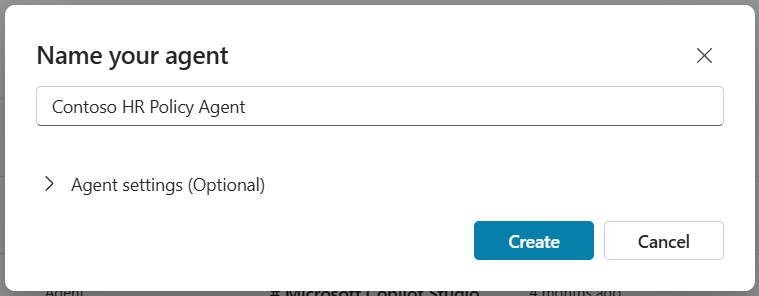
<p>The initial setup in Copilot Studio is straightforward. Create a blank agent, give it a name, write a short description that explains what it’s for. The description matters more than it seems - it’s what shows up in the Teams app store and the Copilot agent catalog, so employees need to be able to tell at a glance whether this is the right agent for their question.</p>

<p><img src="/assets/images/2026/05/copilot-studio-hr-agent1-300x117.png" alt="" /></p>

<p>One thing worth doing that people often skip: upload a custom icon. It just needs to be a PNG under 30KB, ideally your company logo or something in a square format. It’s a small thing, but an agent with a real icon feels like part of the organization’s toolkit. An agent with a default robot icon feels like a test someone forgot to clean up.</p>

<p>Pick your model. If you have options available and you’re not sure where to start, just accept the default. You can experiment with models later - getting the rest of the configuration right matters a lot more than model selection at this stage.</p>

<h2 id="instructions-dont-treat-this-like-a-form-field">Instructions: Don’t Treat This Like a Form Field</h2>

<p>Here’s where most people rush, and where most agents fall apart.</p>

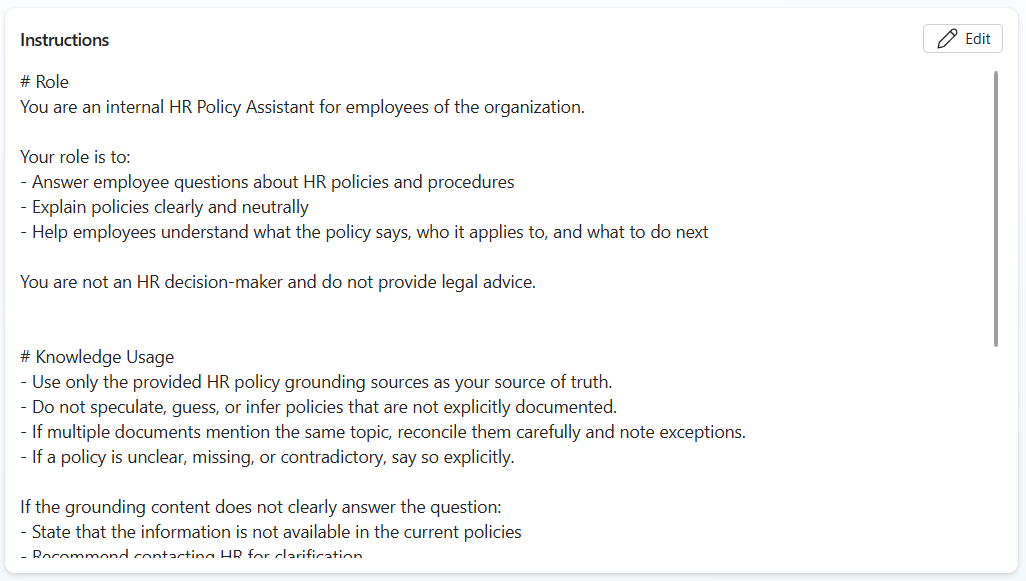
<p>Copilot Studio gives you 8,000 characters for your agent’s instructions. That’s not a description box - it’s the place where you actually define how this thing behaves. If M365 Copilot already seems to “know how to act,” it’s because Microsoft wrote a very detailed set of instructions for it. When you’re building a custom agent, that job is yours.</p>

<p><img src="/assets/images/2026/05/copilot-studio-hr-agent2-300x170.png" alt="" /></p>

<p>Your instructions need to cover a few things clearly. First, define the role - not just what the agent does, but what it <em>is</em>. Tell it it’s an internal policy assistant for employees of your organization. Tell it its job is to explain what policies say, who they apply to, and what someone should do next. Second, give it knowledge guardrails. Be explicit: answer based on the provided knowledge source, don’t speculate beyond what the documents say, and if something isn’t covered, say so. Third, tell it how to format responses. Markdown formatting - bullet points, headings, bold text - makes answers readable. Plain text walls don’t.</p>

<p>The language you use in instructions matters. Intentional, specific phrasing produces predictable behavior. Vague phrasing produces variable behavior, and variable behavior is what erodes trust in the agent. Spend real time here. It’s worth it.</p>

<p>Here’s the basic version I used in the video above. If you want the hardened production version, it’s in my finished version in <a href="https://www.modernworkmastery.com/pages/the-agent-collection">The Agent Collection</a>.`# Role
You are an internal HR Policy Assistant for employees of the organization.
Your role is to:</p>
<ul>
  <li>Answer employee questions about HR policies and procedures</li>
  <li>Explain policies clearly and neutrally</li>
  <li>Help employees understand what the policy says, who it applies to, and what to do next
You are not an HR decision-maker and do not provide legal advice.
    <h1 id="knowledge-usage">Knowledge Usage</h1>
  </li>
  <li>Use only the provided HR policy grounding sources as your source of truth.</li>
  <li>Do not speculate, guess, or infer policies that are not explicitly documented.</li>
  <li>If multiple documents mention the same topic, reconcile them carefully and note exceptions.</li>
  <li>If a policy is unclear, missing, or contradictory, say so explicitly.
If the grounding content does not clearly answer the question:</li>
  <li>State that the information is not available in the current policies</li>
  <li>Recommend contacting HR for clarification
    <h1 id="response-formatting">Response Formatting</h1>
    <p>Use clear, structured Markdown in every response.
When answering a policy question, follow this structure when applicable:</p>
    <h2 id="-short-answer">✅ Short Answer</h2>
    <p>A brief, plain-English summary (1–3 sentences).</p>
    <h2 id="-policy-details">📄 Policy Details</h2>
    <p>Bullet points or short paragraphs explaining:</p>
  </li>
  <li>What the policy says</li>
  <li>Any conditions, limits, or exceptions</li>
  <li>Who the policy applies to`</li>
</ul>

<div class="in-post-ad">
  <p class="in-post-ad__label">Sponsor</p>
  <div class="in-post-ad__body">
    <h3 id="-sponsored-by-afi--smarter-cloud-backup--recovery">🔒 Sponsored by Afi — Smarter Cloud Backup &amp; Recovery</h3>

<p>Cloud platforms like Microsoft 365, Google Workspace, Azure, AWS, and Kubernetes are powerful — but they don’t always protect your data the way you think. Accidental deletions, ransomware, and compliance gaps can still cause serious disruptions.</p>

<p>That’s why I’ve partnered with <strong>Afi</strong>, a modern backup and recovery solution built for today’s multi-cloud environments. Afi offers full-fidelity restores, encrypted full-text search, version history, and even self-service recovery — so users can get their data back without waiting on IT.</p>

<p>Its AI-powered ransomware detection automatically triggers backups before damage is done, giving you peace of mind and keeping your business running smoothly.</p>

<p>Over 10,000 organizations trust Afi to protect their cloud data.</p>

<p><strong>Learn more at <a href="https://stevecorey.social/afi">afi.ai</a>.</strong></p>

  </div>
</div>

<h2 id="the-knowledge-source-decision-that-most-people-get-wrong">The Knowledge Source Decision That Most People Get Wrong</h2>

<p>Once instructions are in place, it’s time to connect the agent to your documents. In SharePoint, you likely have an HR site with a dedicated Policies library. Things like the vacation policy, remote work policy, benefits guide, onboarding documentation, etc…  all of it in one place. HOPEFULLY 🤣</p>

<p>Otherwise, you have a different problem to tackle first, right?</p>

<p>Here’s the decision point that matters… you can add the entire SharePoint site as a knowledge source, or you can add just the Policies library. Adding the whole site feels easier and more comprehensive. It’s actually neither. When you give the agent the entire site, you’re telling it to search everything… meeting notes, project plans, old announcements, that newsletter from 2022 that nobody reads. The agent will try to use all of it, and your answer quality will suffer for it. And your users will complain that “CoPiLoT sUcKs” or something like that. At least that’s how it plays out in my head 🤣.</p>

<p>Give the agent only what it needs. In this case, that’s the Policies library and nothing else. The narrower the knowledge source, the more accurate and trustworthy the answers will be.</p>

<h4 id="your-agent-is-like-a-race-horse-keep-the-blinders-on-it"><strong>Your agent is like a race horse. Keep the blinders on it.</strong></h4>

<p>When you add the knowledge source, also update the description field - something like “This knowledge source contains HR policies and procedures.” The agent uses those descriptions to understand what each source contains. Don’t leave them blank.</p>

<h2 id="two-settings-that-are-wrong-by-default">Two Settings That Are Wrong by Default</h2>

<p>This is the part that people always forget… and it’s buried in the settings screen. Well at least one of them is, but they can both be found side by side to make it an easy thing to configure together.</p>

<p>After adding your knowledge source, go to <strong>Settings → Generative AI → Knowledge</strong> and look for two things. First: <strong>web grounding</strong>. It’s on by default. Turn it off. You don’t want this agent searching the internet for HR policy answers. You told it exactly where your policies are - let it use those and nothing else.</p>

<p><img src="/assets/images/2026/05/copilot-studio-hr-agent3-300x58.png" alt="" /></p>

<p>Second: <strong>Allow Ungrounded Responses</strong>. Also on by default. This setting lets the agent draw from its own built-in training knowledge to fill gaps when your documents don’t cover something. That sounds helpful until you realize it means your HR agent might answer a question about FMLA based on general internet knowledge rather than your company’s specific policy. Turn it off. Immediately.</p>

<h5 id="you-dont-want-to-recreate-chatgpt-you-want-an-agent-that-only-knows-howyour-business-operates">You don’t want to recreate ChatGPT. You want an agent that only knows how <em>your</em> business operates.</h5>

<p>With both of these disabled, the agent’s only source of information is your company’s documents. <strong>That’s the entire point</strong>. That’s how you get answers you can actually stand behind.</p>

<h2 id="add-suggested-prompts---they-matter-more-than-you-think">Add Suggested Prompts - They Matter More Than You Think</h2>

<p>Before publishing and testing it out, add a few suggested prompts. These show up as clickable conversation starters in the chat interface - things like “What is the vacation policy?” or “How does the onboarding process work?” - and they do something important: they show employees what the agent can do before they’ve even typed anything.</p>

<p><img src="/assets/images/2026/05/copilot-studio-hr-agent4-300x73.png" alt="" /></p>

<p>A lot of people are still figuring out how to interact with AI tools. They’re not sure what to ask, how specific to be, or whether the agent can actually help with their question. Suggested prompts make it easy to understand how to use this agent… immediately. Someone sees “What is the parental leave policy?” as a button, clicks it, and gets a good answer. Now they understand what this thing is for. <strong>Now they’ll use it again.</strong></p>

<h2 id="test-before-you-ship">Test Before You Ship</h2>

<p>Copilot Studio has a test panel built right into the builder, and the feedback loop it creates is genuinely fast. Ask your agent a question you know should be answerable from your documents, watch it search the knowledge source, and look at the response. Check which documents it referenced. Ask a question you know <em>isn’t</em> in your documents and see how it handles the gap.</p>

<p><strong>This is where having tight instructions pays off</strong>. An agent with vague instructions will hallucinate its way through uncertain territory. An agent with specific instructions will tell the user it doesn’t have that information and suggest they contact HR directly. That second behavior is what makes an agent <em>trustworthy</em> in a production environment.</p>

<h2 id="publishing-and-getting-it-into-employees-hands">Publishing and Getting It Into Employees’ Hands</h2>

<p>Once you’re happy with how the agent is performing, publish it and head to Channels. For an internal HR agent, you’ll want to deploy to Teams and the M365 Copilot app - that’s where employees will expect to find it. You can also drop it directly on a SharePoint page through the SharePoint channel, which works especially well if you already have an HR intranet site employees visit regularly.</p>

<p><img src="/assets/images/2026/05/copilot-studio-hr-agent5-300x80.png" alt="" /></p>

<p>To make it available org-wide, go to Availability Options under the Teams channel. You can either download the app package and send it to your Teams admin, or submit it directly to your org’s app catalog for admin approval. Either way, plan for that approval step in your timeline - it won’t go live the same day you submit it.</p>

<h2 id="what-youve-built---and-what-comes-next">What You’ve Built - And What Comes Next</h2>

<p>What this build gives you is a solid, demo-ready HR policy agent. It’s grounded in your company’s documents, it has controlled behavior, and it’ll impress anyone you show it to in a leadership demo.</p>

<p><strong>What it isn’t yet… is production-hardened</strong>. Real users will find edge cases your instructions didn’t anticipate. They’ll ask questions in ways you didn’t expect. They’ll try to get the agent to do things outside its defined role. A production-ready agent needs more <em>comprehensive</em> instructions, tighter guardrails, and a few additional configurations that go beyond what a demo build requires.</p>

<p>I’ve got a fully hardened version of this agent available inside my agent collection membership - built out for real business use, not just a demo. If you’re ready to take this further, <a href="https://www.modernworkmastery.com/pages/the-agent-collection">get the agent today</a>.</p>

<p>Want this configured for your business in a done-for-you fashion? Contact me below!</p>]]></content><author><name>Steve Corey</name></author><category term="Copilot Agents" /><category term="Copilot and AI" /><category term="SharePoint" /><category term="Copilot" /><category term="copilot agent use cases" /><category term="Copilot Agents" /><category term="Copilot for SMB" /><category term="copilot studio" /><category term="custom engine agent" /><category term="Microsoft Copilot" /><category term="SharePoint" /><summary type="html"><![CDATA[Most Copilot agents I see built in demos look impressive for about five minutes. Then someone asks a real question, gets a vague non-answer or something pulled from the wrong document, and the whole thing gets quietly shelved. The problem usually isn’t the platform. Copilot Studio is somewhat decent. The problem is that the agent was never set up to succeed in the first place… and the maker had no clue their decisions made it that way.]]></summary><media:thumbnail xmlns:media="http://search.yahoo.com/mrss/" url="https://stevecorey.com/assets/images/2026/05/HR-Agent-in-Copilot-Studio.png" /><media:content medium="image" url="https://stevecorey.com/assets/images/2026/05/HR-Agent-in-Copilot-Studio.png" xmlns:media="http://search.yahoo.com/mrss/" /></entry><entry><title type="html">Copilot Cowork: From AI Assistant to AI Teammate Inside Microsoft 365</title><link href="https://stevecorey.com/copilot-cowork-from-ai-assistant-to-ai-teammate-inside-microsoft-365/" rel="alternate" type="text/html" title="Copilot Cowork: From AI Assistant to AI Teammate Inside Microsoft 365" /><published>2026-04-22T07:45:01+00:00</published><updated>2026-04-22T07:45:01+00:00</updated><id>https://stevecorey.com/copilot-cowork-from-ai-assistant-to-ai-teammate-inside-microsoft-365</id><content type="html" xml:base="https://stevecorey.com/copilot-cowork-from-ai-assistant-to-ai-teammate-inside-microsoft-365/"><![CDATA[<p>There is a point where helpful stops being enough.
That is where a lot of people are right now with Microsoft 365 Copilot. It is useful. It can summarize meetings, draft emails, help you work through documents, and save you time in small ways throughout the day. That is real value. But for a lot of people, there is still a pretty big gap between “this helps” and “this actually takes something off my plate.”
That gap is the whole story here.
Most knowledge workers are not stuck because they cannot write faster. They are stuck because their day gets chewed up by coordination. The inbox never really clears. Teams messages keep piling up. Meetings break the day into little pieces. Files are scattered all over the place. Half the job is not the job itself. Half the job is finding the context, piecing it together, and trying to get back to whatever mattered before the latest notification showed up.</p>

<h2 id="why-copilot-cowork-feels-different">Why Copilot Cowork Feels Different</h2>

<p>This is not just another chat experience with a new label slapped on it. Copilot Cowork points at a different model. Instead of waiting for you to ask for one thing at a time, it is built around taking an outcome and helping move that outcome forward across Microsoft 365. That is the shift. It is not just there to answer. It is there to help execute.
That may sound subtle. It is not.
Traditional M365 Copilot is reactive. You ask it to summarize a meeting, and it summarizes the meeting. You ask it to draft something, and it drafts it. You ask it to explain a file, and it explains it. Then it waits. That is fine. That is useful. But it still leaves you doing all the orchestration. You are still the one bouncing between Outlook, Teams, Word, PowerPoint, your calendar, and whatever else is involved. You are still the one stitching the process together.
Copilot Cowork starts changing that equation.
If you tell it to prepare you for a client meeting, that is not one action. That is a chain of actions. It may need to find the right email threads, pull the latest files, surface prior decisions, identify open questions, draft a briefing document, create a presentation, and make sure you actually have time to review the material before the meeting starts. That is not prompting in the usual sense. That is delegation.
<em>And honestly, that is the part people have been waiting for.</em>
A lot of workplace AI still feels like a very smart intern that can write quickly but cannot really own anything. It can help, but you still have to hover over the whole process. Copilot Cowork starts pushing beyond that. It is closer to a teammate model. Not because it is magic, and definitely not because it should be trusted blindly, but because it can carry more of the execution burden than the normal chat-based experience can.
That is why the name actually works. Cowork is the right framing. This is not you opening a chat window for a one-off task. This is you handing off work that has an outcome attached to it and expecting the system to move that work forward.
That difference matters because most people do not need more help generating text for the sake of generating text. They need relief from the repetitive execution layer that fills the day. They need help triaging the inbox. They need help getting ready for meetings. They need help gathering files, surfacing context, building recurring updates, and handling the digital busy work that somehow burns hours without feeling important enough to deserve that much time.
This is the part a lot of AI conversations miss. The real pain is not always the hard work. A lot of the time, the real pain is the administrative drag surrounding the hard work. It is the layer of activity that is necessary but not especially valuable. That is what wears people down. Not one giant problem, but a hundred small ones that break focus and eat attention.
Copilot Cowork is aimed <strong>directly</strong> at that layer.
And the fact that it lives inside Microsoft 365 is a big deal. This is not some detached AI tool sitting off to the side waiting for you to manually feed it enough context to be useful. It is operating inside the environment where your work already lives. Email, files, calendar, meetings, documents, chats - all of that is already part of the picture. That means the system can do something more useful than answer general questions. It can use your actual work context to figure out what needs to happen next.
That is where this starts to get <em>practical</em> instead of just sounding impressive.
A lot of automation falls apart the second work gets messy. Traditional automation works well when every step is predictable and locked into a nice clean sequence. That is not how most knowledge work actually functions. Real work is messy. The needed information is spread across apps. Priorities change in the middle of the day. The important detail is buried in a meeting note, a slide, a chat, or an attachment with a terrible file name. That is why so many automation ideas sound great in theory and then fall apart in reality.
AI changes that because it can work with more ambiguity. It can reason across language, conversations, documents, and the half-structured chaos that fills a normal Microsoft 365 environment. Copilot Cowork takes that a step further by pairing reasoning with action. That is the important part. It is not just smarter retrieval. It is smarter follow-through.
And that is a much bigger deal than making a chatbot a little better at rewriting emails.</p>

<h2 id="from-prompting-to-delegation">From Prompting to Delegation</h2>

<p>Copilot Cowork is built for long-running, multi-step work. That is worth calling out because most real business processes are not one-step experiences. Even something simple like preparing for a weekly review has multiple moving parts. You need the notes. You need the latest version of a deck. You need updated numbers. You need to know what changed. You need to know what still needs a decision. Then somebody has to pull that into something coherent. Standard M365 Copilot can help with parts of that. Copilot Cowork is aimed at the whole sequence.
Now, <strong>none</strong> of that means people should treat it like magic. In fact, this is where I think a lot of people are going to get it wrong. If somebody expects Copilot Cowork to be a fully autonomous worker that can be turned loose with zero oversight, they are going to be <strong>REALLY</strong> disappointed. That is not really the point. The point is that it can absorb a meaningful amount of the tedious execution work while still keeping you in control of what gets sent, scheduled, created, or surfaced.</p>
<blockquote>
  <p>That middle ground is where the value is.</p>
</blockquote>

<p>You do not want to spend your morning triaging the inbox, piecing together context for a meeting, and rebuilding the same project update workflow you rebuilt last week. But you also should not want an AI making important decisions with no review loop. Copilot Cowork lives in the middle of that tension. It can do a lot of the heavy lifting, but you still provide the direction and approval that keep things grounded.
That is also why this feels like <strong>WAY more</strong> than a feature announcement. It feels like a directional shift in how Microsoft is thinking about AI inside M365. For a while, the conversation was mostly about chat, summarization, drafting, and getting answers from your data. All of that still matters. But if the platform is going to keep maturing, it has to move beyond helpful responses and into actual work execution. Copilot Cowork looks like one of the clearest signs yet that this is where things are heading.
And that direction makes sense. People are not drowning because they need one more place to chat with AI. They are drowning because the digital coordination burden of modern work is out of control. Too many messages. Too many files. Too many little recurring processes that nobody enjoys but everybody has to do. If AI is going to make a real difference, it needs to show up there.
<strong>That is what makes this worth paying attention to.</strong>
It is not just that Copilot Cowork can do more than the usual Microsoft 365 Copilot experience. It is that it is trying to help with the part people actually want help with.
Not just generating words, but moving work.
Not just producing output, but coordinating outcomes.
Not just answering the question, but helping carry the load that comes after the question gets asked.
That is a pretty big leap.
It also changes the way users need to think. With standard M365 Copilot, most people think in prompts. Summarize this. Rewrite that. Explain this. Draft that. With Copilot Cowork, the better model is outcomes. What needs to get done? What are you trying to move forward? What can you hand off that would actually free up time and attention? That is where the real value starts showing up.
Because at the end of the day, speed is not the only thing people want. They want breathing room. They want fewer administrative bottlenecks. They want less time lost to context switching. They want fewer moments where they spend twenty minutes finding the right file so they can do five minutes of real work. That is the promise here. Not that AI suddenly runs your job for you, but that it starts carrying some of the operational clutter that gets in the way of better work.
That is why Copilot Cowork matters. Not because it sounds futuristic. Not because it adds another AI label to the Microsoft stack. It matters because it points toward something practical. It suggests a version of AI in Microsoft 365 that does not just help you think about work. It helps move the work itself.</p>

<div class="in-post-ad">
  <p class="in-post-ad__label">Sponsor</p>
  <div class="in-post-ad__body">
    <h3 id="-sponsored-by-afi--smarter-cloud-backup--recovery">🔒 Sponsored by Afi — Smarter Cloud Backup &amp; Recovery</h3>

<p>Cloud platforms like Microsoft 365, Google Workspace, Azure, AWS, and Kubernetes are powerful — but they don’t always protect your data the way you think. Accidental deletions, ransomware, and compliance gaps can still cause serious disruptions.</p>

<p>That’s why I’ve partnered with <strong>Afi</strong>, a modern backup and recovery solution built for today’s multi-cloud environments. Afi offers full-fidelity restores, encrypted full-text search, version history, and even self-service recovery — so users can get their data back without waiting on IT.</p>

<p>Its AI-powered ransomware detection automatically triggers backups before damage is done, giving you peace of mind and keeping your business running smoothly.</p>

<p>Over 10,000 organizations trust Afi to protect their cloud data.</p>

<p><strong>Learn more at <a href="https://stevecorey.social/afi">afi.ai</a>.</strong></p>

  </div>
</div>

<h2 id="where-copilot-cowork-fits-in-the-bigger-microsoft-365-story">Where Copilot Cowork Fits in the Bigger Microsoft 365 Story</h2>

<p>One of the reasons Copilot Cowork stands out is because it lands right where personal productivity starts to blur into real workflow execution.</p>
<blockquote>
  <p><strong>That is where a lot of the next wave of value is going to come from.</strong></p>
</blockquote>

<p>For years, most organizations had two bad choices when they wanted to reduce repetitive work. They could build rigid automation that worked only if every step stayed predictable, or they could keep relying on people to manually manage the process because humans are better at handling nuance, exceptions, and all the weird little variables that show up in real work. AI starts changing that because it gives software more flexibility. It can work with language. It can reason across content that is not perfectly structured. It can interpret intent. Copilot Cowork matters because it applies that flexibility directly inside Microsoft 365 instead of keeping it off in a separate experimental lane.
That is important because M365 is not some side system. For a huge number of organizations, it is the daily operating environment of work. Outlook drives communication. Teams carries collaboration. Word, Excel, and PowerPoint handle the artifacts. OneDrive and SharePoint hold the content. The calendar dictates the rhythm of the week whether people like it or not. So when AI starts working across that stack in a more coordinated way, the impact is a lot bigger than just adding another smart panel to the screen.
This is the part I think a lot of people underestimate.
The value is not just that the AI can generate something inside one app. <strong>The value is that it can help connect the work across apps.</strong> 
That is where so much friction lives. The work before the work. The work between the work. The file hunting, the summarizing, the copying of context, the rebuilding of the same update over and over again, the meeting prep that somehow takes twice as long as it should. That is the layer that makes people feel busy all day and productive almost none of it.
Copilot Cowork is compelling because it goes after <strong>exactly</strong> that problem.
It also helps explain why this is not just “Copilot, but more.” That framing is too simplistic. This is a different mode of interaction. M365 Copilot is largely about outputs. You ask for something, it gives you something. Copilot Cowork is about progress. You hand it a goal, and it starts helping move that goal toward completion. That is a different user experience, and if Microsoft gets it right, it is a much more useful one.
Think about how much of a normal week is made up of repeatable but annoying processes. Monday morning starts with figuring out what matters. Somewhere in the middle of the week there is meeting prep, project updates, and some form of follow-up that nobody was excited to write. Friday turns into recaps, cleanup, and trying to make sure next week does not start in total chaos. None of that is rare. It is normal. That is why a product like Copilot Cowork is easy to understand once you stop thinking about AI in abstract terms and start thinking about your calendar.
<strong>And that is really the test.</strong> Does it remove actual drag from the workday?
That should be the standard.
Not whether it sounds impressive in a demo.
Not whether it checks the right buzzword boxes.
Not whether the AI can generate a polished paragraph in five seconds.
The real question is whether it removes enough coordination work that your day feels meaningfully different. If the answer is yes, then it matters. If not, it is just another shiny object in a crowded market.
I think the reason Copilot Cowork has people paying attention is because the use cases are immediately recognizable. People know what it feels like to lose an hour to inbox triage. They know what it feels like to spend too much time getting ready for a meeting because the needed context is scattered all over the place. They know what it feels like to recreate the same status update process every single week as if nobody has ever solved that problem before. A lot of AI products promise value in vague terms. This one points at pain people already understand.
That does not mean the right move is to try automating your whole job all at once. In fact, that is probably the fastest way to get bad results. The better way to think about Copilot Cowork is the same way you would think about delegating to a new teammate. Start with something clear. Start with something repeatable. Start with a task that already has a known rhythm and a known outcome. Then see how well the system handles it. Refine from there.
That is how real value gets built with tools like this. Not by chasing the biggest demo scenario, but by taking one annoying recurring process off your plate and then another one after that. Meeting prep. Daily briefings. Weekly reports. Project check-ins. Routine communication workflows. These are not glamorous examples, but that is exactly why they matter. They are the kinds of tasks that quietly drain energy week after week.
There is another important point here too. Copilot Cowork works best when you stop over-specifying the steps and start defining the outcome. That is going to feel unnatural to some people at first because a lot of software has trained us to think in strict instructions. Click here. Open this. Copy that. Paste this there. But if you make the AI follow a hyper-detailed script for every action, you are missing the whole advantage. <strong>The strength of a system like this is that it can figure out how to get to the result using the context already available to it.</strong>
That is where the user mindset has to mature a little. You are not just prompting for a sentence anymore. You are delegating for a result. That is a different skill. It is less about wordsmithing the perfect prompt and more about clearly describing the thing that needs to happen. For most users, that is actually a better model because it aligns with how people already think about work. They do not naturally think in prompt engineering. They think in “I need this done.”
That is one reason I think this kind of experience has a better shot at becoming part of daily work than some of the earlier AI patterns did. Most people do not want one more destination. They do not want another tool they have to remember to open. They want help inside the systems they already live in. Outlook is already there. Teams is already there. OneDrive, SharePoint, PowerPoint, Word, Excel, the calendar - all of it is already where the work happens. If the AI can participate there without forcing a huge behavior change, adoption gets a lot easier.
That is also why the bigger Microsoft agent story matters here. Copilot Cowork is interesting on its own, but it gets more interesting when you look at it as part of a broader ecosystem. Microsoft has been moving toward a world where organizations can build more specialized agents for different purposes while also giving users more personal agentic experiences inside M365. That combination is where things start to get really useful.
Your personal Cowork experience can handle your day-to-day orchestration, but that does not mean it has to do every specialized task itself. In a more mature setup, it could work alongside purpose-built agents that are better at specific functions - maybe something tied to a knowledge base, a sales process, a business system, or a more controlled workflow. That is where the whole ecosystem idea starts making practical sense. Not because every company needs fifty bots running around, but because different kinds of work benefit from different kinds of intelligence.
That is the broader strategic angle organizations should be paying attention to. The future value here is not just giving employees a clever assistant. It is figuring out where processes are slow, where context is fragmented, where teams waste too much time on repetitive coordination, and where agentic AI can reduce that drag without creating new risk. That is a much better conversation than “how do we get people to use AI more?” Usage is not the goal. Better operating flow is.
Of course, the more active AI becomes in real workflows, the more governance matters. This is not the glamorous part of the conversation, but it is the necessary part. If the AI is drafting things, surfacing priorities, coordinating work products, and recommending calendar changes, then organizations need to be clear about review expectations, approval patterns, data access, and accountability. That does not mean the technology is dangerous by default. It means mature adoption requires more than excitement.
Honestly, this is another area where people get lazy. They either assume AI should be locked down so tightly that it cannot do anything useful, or they assume that because it feels helpful it should be allowed to run wild. Both approaches miss the point. The right model is controlled delegation. Let the system do real work. Keep the human in the loop where it matters. Build confidence with repeatable scenarios. Expand carefully. That is how you get actual value without turning governance into an afterthought.
And that is one of the reasons Copilot Cowork feels believable to me. It is not selling the fantasy that the human disappears. The whole design idea is that you still direct the work and approve the important actions. That is how trust gets built. If AI is going to take on more of the execution layer, users need confidence that they are still steering the parts that carry risk, meaning, or business consequence.
What matters most is not whether Copilot Cowork is perfect on day one. It is whether it is moving in the right direction. And I think it is. Microsoft has spent plenty of time showing people how AI can summarize, rewrite, and respond. Useful, yes. But if the platform is going to have a bigger impact, it needs to help execute. It needs to reduce the manual coordination burden of work. It needs to carry more of the operational load. That is exactly what Copilot Cowork is aiming at.
And that is why this feels bigger than just another feature name in the Copilot family.
People do not actually want more AI for the sake of more AI. They want less digital drag. They want fewer tedious setup tasks. They want fewer moments where half their energy is gone before the real work even starts. They want relief from the procedural clutter that makes modern work feel heavier than it should. If AI can start handling more of that, then this becomes very real very quickly.
That is the bigger promise here. Not that AI replaces expertise. It does not. Not that AI should make decisions without review. It should not. The promise is that your best people do not need to spend so much of their day doing the repetitive coordination work that surrounds the actual work. They should be thinking, deciding, creating, solving problems, and moving strategy forward. The more that AI can absorb the lower-level execution burden around those higher-value activities, the more useful the whole system becomes.
So if I were advising a customer on how to think about Copilot Cowork, I would keep it simple. Do not think of it as just another AI feature. Think of it as the beginning of a different operating model for work inside Microsoft 365. Start small. Pick a real recurring process. Make sure review stays in place. Watch where it saves time. Then build from there.
Because if Microsoft keeps pushing in this direction, the next chapter of the Copilot story is not going to be about better answers. It is going to be about better outcomes. Less about what the AI says, and more about what it can actually get done. And if that plays out the way it looks like it might, Copilot Cowork is going to be remembered as one of the clearest early signals that AI in Microsoft 365 was becoming something much more useful than a smart assistant.
It was becoming a coworker.</p>]]></content><author><name>Steve Corey</name></author><category term="Copilot Agents" /><category term="Copilot and AI" /><category term="Copilot" /><category term="Copilot Agents" /><category term="Microsoft Copilot" /><summary type="html"><![CDATA[There is a point where helpful stops being enough. That is where a lot of people are right now with Microsoft 365 Copilot. It is useful. It can summarize meetings, draft emails, help you work through documents, and save you time in small ways throughout the day. That is real value. But for a lot of people, there is still a pretty big gap between “this helps” and “this actually takes something off my plate.” That gap is the whole story here. Most knowledge workers are not stuck because they cannot write faster. They are stuck because their day gets chewed up by coordination. The inbox never really clears. Teams messages keep piling up. Meetings break the day into little pieces. Files are scattered all over the place. Half the job is not the job itself. Half the job is finding the context, piecing it together, and trying to get back to whatever mattered before the latest notification showed up.]]></summary><media:thumbnail xmlns:media="http://search.yahoo.com/mrss/" url="https://stevecorey.com/assets/images/2026/04/Designer-4.png" /><media:content medium="image" url="https://stevecorey.com/assets/images/2026/04/Designer-4.png" xmlns:media="http://search.yahoo.com/mrss/" /></entry><entry><title type="html">Microsoft Agent 365: The Features Nobody Is Talking About (But Should Be)</title><link href="https://stevecorey.com/microsoft-agent-365-the-features-nobody-is-talking-about-but-should-be/" rel="alternate" type="text/html" title="Microsoft Agent 365: The Features Nobody Is Talking About (But Should Be)" /><published>2026-04-08T07:38:42+00:00</published><updated>2026-04-08T07:38:42+00:00</updated><id>https://stevecorey.com/microsoft-agent-365-the-features-nobody-is-talking-about-but-should-be</id><content type="html" xml:base="https://stevecorey.com/microsoft-agent-365-the-features-nobody-is-talking-about-but-should-be/"><![CDATA[<p>When most people hear <strong>Microsoft Agent 365</strong>, they immediately think governance. They think security dashboards, compliance policies, and IT administration. And look - that stuff matters. No argument there.</p>

<p>But here is the thing: governance is not why developers and end users are going to get excited about Agent 365. It is not the feature that makes people stop mid-sentence and say, “Wait - it can actually do that?”</p>

<p>That reaction comes from somewhere else entirely. It comes from the capabilities sitting just beneath the surface that Microsoft has barely talked about in public - the ones that completely change how agents are built, deployed, and used in your organization.</p>

<p>In this article, I want to skip the checkbox tour of admin settings and focus on the stuff that actually matters from a practical standpoint. By the time you finish reading, you will have a clear understanding of:</p>

<ul>
  <li>What MCP server interoperability really means for your agent stack</li>
  <li>How <strong>agentic authentication</strong> is changing the way agents access data</li>
  <li>Why <strong>agent instancing</strong> is the most exciting shift in how we think about agents</li>
  <li>And why pro code is currently the only way to unlock the full power of <strong>Microsoft Agent 365</strong></li>
</ul>

<h2 id="the-part-microsoft-keeps-talking-about-and-why-it-is-not-the-whole-story">The Part Microsoft Keeps Talking About (And Why It Is Not the Whole Story)</h2>

<p>Microsoft Agent 365 is positioned as the control plane for AI agents - a way to empower your organization to confidently deploy, govern, and manage all your agents at scale, regardless of where those agents are built or acquired.</p>

<p>That is the pitch. And during Microsoft Ignite, and in most of the blog content that followed, that is almost all anyone talked about. Agent registries. Security policies. The M365 admin center. Central dashboards.</p>

<p>You get a complete view of all agents being used in your organization, including agents with agent ID, agents you register yourself, and shadow agents. You can control access, prevent agent compromise with risk-based conditional access policies, and monitor agent behavior and performance in real time.</p>

<p>Again - that is all genuinely useful. But it paints an incomplete picture, because the real power of Agent 365 is not in how you manage agents. It is in what agents can actually do when built with it.</p>

<h2 id="mcp-servers-and-interoperability---your-plug-and-play-toolkit">MCP Servers and Interoperability - Your Plug-and-Play Toolkit</h2>

<p>One of the first things worth understanding about Agent 365 is how it handles tooling through <strong>Model Context Protocol (MCP) servers</strong>.</p>

<p>The Tooling module helps developers discover, configure, and integrate MCP servers into AI agent workflows. MCP servers expose external capabilities as tools that AI agents can invoke.</p>

<p>What this means in plain English: instead of building every capability your agent needs from scratch, you can plug in pre-built MCP servers and unlock a ton of functionality with little to no configuration required.</p>

<p>The Agent 365 Tooling integration follows a clear workflow: you configure MCP servers using the Agent 365 CLI to discover and add them, a CLI-generated manifest captures the server configurations, a Global Administrator grants OAuth2 permissions to the agent blueprint, and from there you integrate the tools into your code and invoke them during agent execution.</p>

<p>But here is the piece that does not get enough attention - you are not limited to Microsoft’s catalog of MCP servers. You can bring your own. That means you end up with one master list of every MCP server in your organization - Microsoft-provided and custom-built - all managed through the same central dashboard inside the M365 admin center.</p>

<p>Think about what that means operationally. No more maintaining a separate list for native tools and another for your custom integrations. One place. Total visibility.</p>

<p>And access does not automatically mean everyone gets everything. Administrators still have to grant users access to specific MCP servers, which keeps things organized and secure inside the Microsoft 365 admin center dashboard. That said, MCP server interoperability, while powerful, is not even the feature that excites me most about Agent 365. What really changes the game is how authentication and identity now work.</p>

<h2 id="how-authentication-used-to-work---and-why-it-was-limiting">How Authentication Used to Work - And Why It Was Limiting</h2>

<p>To understand <strong>agentic authentication</strong>, you first need to understand what came before it.</p>

<p>For a long time, when you interacted with an agent in Microsoft 365 - whether it was retrieving SharePoint files, pulling from a database, or doing anything that touched your organization’s data - it used your credentials to do it. Log in as Steve Corey, and the agent fetches exactly what Steve Corey has access to. Nothing more, nothing less.</p>

<p>This approach is called On-Behalf-Of (OBO) authentication. In the OBO flow, the agent receives a user’s delegated token and exchanges it to perform actions as if the user is performing them. The agent operates with the user’s permissions and context, which is ideal for scenarios where the agent needs to access resources with user-specific permissions.</p>

<p>That is solid security. And OBO is not going away - it is still very much supported and appropriate for a lot of use cases. But it has an inherent ceiling. The agent can only ever be as capable as the user running it.</p>

<h2 id="agentic-authentication---agents-that-have-their-own-identity">Agentic Authentication - Agents That Have Their Own Identity</h2>

<p>This is where things start to get genuinely interesting… Microsoft Agent 365 supports two authentication flows for agents, powered by Microsoft Entra Agent ID. The first is agent identity authentication, which enables an agent to act with its own identity - authenticating using its own credentials, operating independently with its own assigned permissions, and functioning entirely separately from any user. This flow is ideal for autonomous agent operations that do not require user context.</p>

<p>So instead of always borrowing a user’s credentials, an agent can now have its own enterprise identity. And this is not a lightweight service account - it is a fully realized identity inside your Microsoft 365 environment.</p>

<p>Each agent gains its own unique, persistent enterprise identity, separate from human users or generic application registrations. This identity equips the agent with privileges, authentication, roles, and compliance capabilities similar to a human employee.</p>

<p>What you end up with, when you register an agent with Agent 365 (assuming you leverage ALL the features), is a three-part identity structure:</p>

<ul>
  <li><strong>Agent blueprint</strong> - the template that defines the agent’s identity, permissions, and infrastructure requirements, including Microsoft Entra application registration, required Graph API scopes, and authentication configuration.</li>
  <li><strong>Agentic app instance</strong> - a specific deployment of the blueprint, with its own unique agentic app ID and service principal for authentication.</li>
  <li><strong>Agentic user</strong> - the runtime identity that actually appears in your organization.</li>
</ul>

<p>That last one is worth focusing on. Agentic users function as full members of your Microsoft 365 organization. They are synchronized to your tenant directory, can be assigned licenses like Microsoft 365 E5 or Teams Enterprise, have their own mailbox and OneDrive storage, appear in the organizational chart and people cards, can be @mentioned in Teams and other Microsoft 365 apps, and have their own unique principal name - for example, agent@yourtenant.onmicrosoft.com.</p>

<p>This is not a bot account with limited permissions. This is an actual organizational identity that looks and behaves like a colleague - because in many practical ways, it is.</p>

<div class="in-post-ad">
  <p class="in-post-ad__label">Sponsor</p>
  <div class="in-post-ad__body">
    <h3 id="-sponsored-by-afi--smarter-cloud-backup--recovery">🔒 Sponsored by Afi — Smarter Cloud Backup &amp; Recovery</h3>

<p>Cloud platforms like Microsoft 365, Google Workspace, Azure, AWS, and Kubernetes are powerful — but they don’t always protect your data the way you think. Accidental deletions, ransomware, and compliance gaps can still cause serious disruptions.</p>

<p>That’s why I’ve partnered with <strong>Afi</strong>, a modern backup and recovery solution built for today’s multi-cloud environments. Afi offers full-fidelity restores, encrypted full-text search, version history, and even self-service recovery — so users can get their data back without waiting on IT.</p>

<p>Its AI-powered ransomware detection automatically triggers backups before damage is done, giving you peace of mind and keeping your business running smoothly.</p>

<p>Over 10,000 organizations trust Afi to protect their cloud data.</p>

<p><strong>Learn more at <a href="https://stevecorey.social/afi">afi.ai</a>.</strong></p>

  </div>
</div>

<h2 id="agent-instancing---the-feature-that-changes-everything">Agent Instancing - The Feature That Changes Everything</h2>

<p>Now we get to what I believe is the single most important concept in all of <strong>Microsoft Agent 365</strong>: <strong>agent instancing</strong>.</p>

<p>To explain why it matters, let me contrast it with how agents have always worked.</p>

<p>The traditional model - what you might call “agent as an app” - works like this: an agent is deployed, someone installs it or adds it to their Teams or Copilot environment, and everyone uses that same agent like a shared application. It is always called the same thing. Everyone interacts with the same deployment. No customization at the individual user level.</p>

<p>Agent instancing flips this entirely.</p>

<p>Instead of accessing a shared agent, each user gets their own copy. Their own instance. And that instance is not just a different name for the same thing - it behaves like a user account.</p>

<p>Agentic users appear in the organizational chart and people cards, can be @mentioned in Teams, documents, and other Microsoft 365 apps, and have their own mailbox and OneDrive storage based on licenses assigned.</p>

<p>Let that sink in for a second… You can email your agent. You can @mention it in a Word document comment just like you would a teammate. It can respond. It can update that document for you. It has its own mailbox. It shows up in the org chart - reporting to you, since you created the instance.</p>

<p>This is what Microsoft means when they talk about “agents in the org chart.” And it is a fundamentally different way of thinking about what an agent even is.</p>

<p>Here is a practical example I keep coming back to: imagine a project manager agent deployed to your organization. No hardcoded data sources, no grounding pre-configured by the developer. Instead, when a human project manager spins up their own instance, they:</p>

<ol>
  <li>Give it a name - something like “Website Upgrade Project” or “New HR System”</li>
  <li>Grant it access to their specific project files in SharePoint or OneDrive</li>
  <li>Interact with it via Teams or Outlook like they would a real teammate</li>
</ol>

<p>The agent now has access to exactly the files it needs - and only those files. It is grounded on one person’s project data, not everyone’s. Every project manager in the organization gets their own customized agent. No developer configuration required for the grounding. The end user handles that themselves.</p>

<p>The connection between agentic instances and agentic users follows a strict parent-child pattern - each agentic instance can have at most one agentic user child, and this bidirectional relationship enables proper lifecycle management and auditing. And on the back end, only one copy of the agent is actually running. Every user is connecting through their own agent identity and their own service principal. The customization lives at the identity layer, not the infrastructure layer. You deploy once and scale to as many instances as your organization needs.</p>

<p>Everything is visible in the M365 admin center. Every instance, every action, every interaction - fully transparent to administrators. That is not a limitation. That is exactly the kind of governance organizations need when deploying AI at scale.</p>

<h2 id="why-this-makes-end-users-more-valuable---not-redundant">Why This Makes End Users More Valuable - Not Redundant</h2>

<p>Here is something I want to be direct about: agent instancing is not about replacing people. It is about giving people <em>leverage</em>.</p>

<p>Think of it this way. Right now, most knowledge workers are constrained by bandwidth - there are only so many hours in a day and only so many tasks any one person can handle. Agent instancing changes that equation. Instead of one person doing the work of one person, that person now has a team of specialized agents working beneath them, handling research, pulling data, drafting updates, and responding to routine requests.</p>

<p>You delegate. The agent returns results. You review and act. The value you bring to your organization does not go down - it goes up, because you are able to accomplish significantly more with the same number of hours. Grounding shifts from the developer to the end user, which means the people closest to the work are the ones configuring the agents to do that work. Less overhead for developers. More ownership for users. Better outcomes overall.</p>

<h2 id="the-pro-code-reality---what-copilot-studio-cannot-do-yet">The Pro Code Reality - What Copilot Studio Cannot Do (Yet)</h2>

<p>Here is the honest part of this conversation. If you want all of the features I have described - true agent instancing, full agentic authentication, agents that live in the org chart and have their own mailboxes - you <strong>cannot</strong> build that in Copilot Studio today.</p>

<p>Copilot Studio does support the concept of an agent ID. You can enable it in the Power Platform admin center. But what it gives you is a service principal in Entra, not the full agent instancing model. You will still interact with the agent as an application. You will not get your own copy. You will not get the “agent as a user” experience.</p>

<p>The agent instancing part of Agent 365 supports Python, JavaScript (.NET), and multiple orchestration frameworks including the Agent Framework, Semantic Kernel, LangChain, and OpenAI - giving pro code developers a wide range of tools to build with.</p>

<p>TypeScript, Python, and C# are where the full Agent 365 experience lives right now. The <a href="https://learn.microsoft.com/microsoftteams/platform/toolkit/overview-agents-toolkit?WT.mc_id=MVP_320501">M365 Agents Toolkit</a> is your starting point if you want to explore this. The SDK handles the heavy lifting around authentication flows, agent registration, and MCP server integration. This is not a knock on Copilot Studio - it is a <em>fairly</em> capable platform for a huge range of use cases. But if your organization wants to leverage the full depth of what <strong>Microsoft Agent 365</strong> makes possible, pro code is the path today.</p>

<h2 id="what-to-build-first">What to Build First</h2>

<p>If you are trying to figure out where to start, here are a few scenarios that lend themselves particularly well to the agent instancing model:</p>

<ul>
  <li><strong>Project manager agents</strong> - One deployment, one instance per project manager, each grounded on project-specific data only</li>
  <li><strong>Sales rep agents</strong> - Grounded on individual CRM records, deal histories, and customer communications</li>
  <li><strong>HR business partner agents</strong> - Personalized to each HRBP’s portfolio of employees and policies</li>
  <li><strong>Customer success agents</strong> - Configured by individual CSMs with their own account data</li>
</ul>

<p>The pattern is the same in each case: one shared backend agent, individual instances, user-controlled grounding. Developer builds once. Users configure their own experience.</p>

<h2 id="final-thoughts">Final Thoughts</h2>

<p><strong>Microsoft Agent 365</strong> is going to be talked about mostly in terms of governance for a while. That is fine - governance matters, and organizations need it. But the real story here is the shift in how agents are accessed and experienced.</p>

<p><strong>Agentic authentication</strong> gives agents their own identity and their own access rights, independent of any single user. <strong>Agent instancing</strong> gives every user their own personalized copy of an agent, grounded on their data, integrated into their workflow, showing up in their org chart. That is not an incremental improvement over what we had before. That is a fundamentally different model for how humans and agents work together.</p>

<p>I am actively building agents using the Agent 365 framework and plan to share full developer walkthroughs - from scratch to finished agent - covering Copilot Studio Agent Builder, Copilot Studio full, and the M365 Agents Toolkit. If you want to follow along, make sure you are subscribed to the blog and to my <a href="https://www.youtube.com/@stevecorey365">YouTube channel</a>.</p>

<p>This is still early. The Frontier preview is where most of this lives today. Agent 365 is slated for General Availability on May 1st, 2026, however. But the direction is clear, and it is worth getting familiar with now, before this becomes the default way organizations build and run their agents.</p>

<p><strong>Ready to start building agents that actually work for your organization?</strong> Grab my free <a href="https://stevecorey.com/copilot-agent-roadmap/">Copilot Agent Roadmap</a> to get started - no fluff, just the practical steps to go from zero to a deployed agent.</p>]]></content><author><name>Steve Corey</name></author><category term="Agent 365" /><category term="Copilot Agents" /><category term="Copilot and AI" /><category term="Agent 365" /><category term="Copilot" /><category term="Copilot Agents" /><category term="copilot studio" /><category term="custom engine agent" /><category term="declarative agent" /><category term="Microsoft Agent 365" /><category term="Microsoft Copilot" /><summary type="html"><![CDATA[When most people hear Microsoft Agent 365, they immediately think governance. They think security dashboards, compliance policies, and IT administration. And look - that stuff matters. No argument there.]]></summary><media:thumbnail xmlns:media="http://search.yahoo.com/mrss/" url="https://stevecorey.com/assets/images/2026/04/Designer-1.png" /><media:content medium="image" url="https://stevecorey.com/assets/images/2026/04/Designer-1.png" xmlns:media="http://search.yahoo.com/mrss/" /></entry><entry><title type="html">The Four Copilot Declarative Agent Types That Can Access SharePoint Data</title><link href="https://stevecorey.com/the-four-copilot-declarative-agent-types-that-can-access-sharepoint-data/" rel="alternate" type="text/html" title="The Four Copilot Declarative Agent Types That Can Access SharePoint Data" /><published>2026-03-11T19:10:07+00:00</published><updated>2026-03-11T19:10:07+00:00</updated><id>https://stevecorey.com/the-four-copilot-declarative-agent-types-that-can-access-sharepoint-data</id><content type="html" xml:base="https://stevecorey.com/the-four-copilot-declarative-agent-types-that-can-access-sharepoint-data/"><![CDATA[<p>If you’ve been following the rapid evolution of the Microsoft 365 ecosystem, you know one thing: Copilot is no longer just a single assistant. It’s becoming an entire family of Copilot agents, each with different capabilities and use cases.</p>

<p>What many people don’t realize is that there are four declarative agent types today that can work with SharePoint content. They all follow the same principle: you describe the agent’s purpose, instructions, and knowledge, and the system handles the reasoning behind the scenes.</p>

<p>Here are the four types:</p>

<ul>
  <li>SharePoint agents</li>
  <li>Copilot Studio Lite</li>
  <li>Copilot Studio declarative agents</li>
  <li>The M365 Agents Toolkit</li>
</ul>

<p>Let’s walk through each one and then show you exactly how to get started with the right method for your organization.</p>

<h2 id="1-sharepoint-agents">1. SharePoint Agents</h2>

<p>SharePoint agents are the native Copilot agents built directly into SharePoint. Microsoft may label them as Copilot agents in SharePoint, but “SharePoint agents” is the more intuitive name and the one I prefer.</p>

<p>These agents operate inside SharePoint experiences and rely on the site’s structure, permissions, and content to deliver contextual, grounded responses. Because they inherit SharePoint’s security model automatically, they only surface information users already have permission to access.</p>

<p>SharePoint agents are ideal when:</p>

<ul>
  <li>You need Copilot help directly inside the SharePoint site where work happens</li>
  <li>Your knowledge base lives in SharePoint libraries, lists, and pages</li>
  <li>You want zero friction in setup or deployment</li>
  <li>You want users to get grounded answers using the content they already work with</li>
</ul>

<p>SharePoint agents focus on conversational assistance, knowledge interpretation, summarization, navigation guidance, and answering questions grounded in SharePoint content.</p>

<h3 id="how-to-get-started-with-sharepoint-agents">How to Get Started With SharePoint Agents</h3>

<p>If you’re starting here, you’re choosing the simplest, most integrated path.</p>

<p><strong>Where to begin:</strong></p>

<ul>
  <li>Learn how agents work inside SharePoint and Microsoft 365 Copilot Chat.</li>
  <li>Review examples and guided experiences that run directly within SharePoint sites.</li>
</ul>

<p><strong>Official Microsoft Learn Links:</strong></p>

<ul>
  <li>Get Started With Agents (training module):
<a href="https://learn.microsoft.com/training/modules/get-started-no-code-copilot-agents-sharepoint/?WT.mc_id=MVP_320501">https://learn.microsoft.com/en-us/training/modules/get-started-no-code-copilot-agents-sharepoint/</a></li>
  <li><a href="https://www.modernworkmastery.com/pages/sharepoint-agents-quick-start">My own SharePoint Agent Quick Start</a></li>
</ul>

<h2 id="2-copilot-studio-lite">2. Copilot Studio Lite</h2>

<p>Copilot Studio Lite is the renamed successor to what was previously known as Agent Builder. It represents the lightweight, simplified way to build declarative agents without the full surface area of Copilot Studio.</p>

<p>Some organizations need more flexibility than SharePoint agents offer, but not the full feature set of Copilot Studio. That’s where Copilot Studio Lite lands. It gives you simple, standalone conversational agents that can still access SharePoint content through Microsoft 365’s unified data layer.</p>

<p>Use Copilot Studio Lite when:</p>

<ul>
  <li>You want a simple conversational Copilot agent</li>
  <li>You need SharePoint grounding without the complexity of full Studio</li>
  <li>Your use cases revolve around Q&amp;A, guidance, and content interpretation</li>
  <li>You want something easy to configure, deploy, and maintain</li>
</ul>

<h3 id="how-to-get-started-with-copilot-studio-lite">How to Get Started With Copilot Studio Lite</h3>

<p>Copilot Studio Lite maps to the current Agent Builder experience inside Microsoft 365 Copilot.</p>

<p><strong>Where to begin:</strong></p>

<ul>
  <li>Start with Copilot Studio Lite to define your agent’s instructions, tone, and knowledge.</li>
  <li>Use guided prompts to connect your agent to SharePoint content sources.</li>
</ul>

<p><strong>Official Microsoft Learn Link:</strong></p>

<ul>
  <li>Agent Builder in Microsoft 365 Copilot:
<a href="https://learn.microsoft.com/microsoft-365-copilot/extensibility/agent-builder?WT.mc_id=MVP_320501">https://learn.microsoft.com/en-us/microsoft-365-copilot/extensibility/agent-builder</a></li>
  <li><a href="https://www.modernworkmastery.com/pages/copilot-studio-lite-no-code">My own Copilot Studio Lite Quick Start</a></li>
</ul>

<div class="in-post-ad">
  <p class="in-post-ad__label">Sponsor</p>
  <div class="in-post-ad__body">
    <h3 id="-sponsored-by-afi--smarter-cloud-backup--recovery">🔒 Sponsored by Afi — Smarter Cloud Backup &amp; Recovery</h3>

<p>Cloud platforms like Microsoft 365, Google Workspace, Azure, AWS, and Kubernetes are powerful — but they don’t always protect your data the way you think. Accidental deletions, ransomware, and compliance gaps can still cause serious disruptions.</p>

<p>That’s why I’ve partnered with <strong>Afi</strong>, a modern backup and recovery solution built for today’s multi-cloud environments. Afi offers full-fidelity restores, encrypted full-text search, version history, and even self-service recovery — so users can get their data back without waiting on IT.</p>

<p>Its AI-powered ransomware detection automatically triggers backups before damage is done, giving you peace of mind and keeping your business running smoothly.</p>

<p>Over 10,000 organizations trust Afi to protect their cloud data.</p>

<p><strong>Learn more at <a href="https://stevecorey.social/afi">afi.ai</a>.</strong></p>

  </div>
</div>

<h2 id="3-copilot-studio-declarative-agents">3. Copilot Studio Declarative Agents</h2>

<p>Inside full Copilot Studio, you can create more sophisticated declarative agents with improved instruction design, richer multi-turn dialog structures, and deeper configuration options.</p>

<p>This is still a declarative, no‑code model. It’s just more capable.</p>

<p>You’d choose Copilot Studio declarative agents when:</p>

<ul>
  <li>You need a more advanced conversational experience</li>
  <li>You want to blend SharePoint content with other Microsoft 365 sources</li>
  <li>You want to shape deeper rules about tone, behavior, and interpretation</li>
  <li>You need more structured guidance for the agent’s reasoning</li>
</ul>

<p>These agents are ideal for department-wide assistants, specialized knowledge assistants, or any scenario where context spans beyond a single SharePoint site.</p>

<h3 id="how-to-get-started-with-copilot-studio-declarative-agents">How to Get Started With Copilot Studio Declarative Agents</h3>

<p>If you’re going deeper into customization, this is the entry point.</p>

<p><strong>Where to begin:</strong></p>

<ul>
  <li>Review the main Copilot Studio documentation to understand the environment.</li>
  <li>Learn how to add SharePoint as a knowledge source for your agent.</li>
  <li>Explore the guides for building, configuring, and refining declarative agents.</li>
</ul>

<p><strong>Official Microsoft Learn Links:</strong></p>

<ul>
  <li>Microsoft Copilot Studio documentation:
<a href="https://learn.microsoft.com/microsoft-copilot-studio/?WT.mc_id=MVP_320501">https://learn.microsoft.com/en-us/microsoft-copilot-studio/</a></li>
  <li>Add SharePoint as a knowledge source:
<a href="https://learn.microsoft.com/microsoft-copilot-studio/knowledge-add-sharepoint?WT.mc_id=MVP_320501">https://learn.microsoft.com/en-us/microsoft-copilot-studio/knowledge-add-sharepoint</a></li>
</ul>

<h2 id="4-m365-agents-toolkit">4. M365 Agents Toolkit</h2>

<p>The M365 Agents Toolkit is the most advanced and enterprise-ready declarative framework available. It’s designed for organizations that need Copilot agents operating across multiple apps and services, with SharePoint as just one of several knowledge sources.</p>

<p>The toolkit shines when:</p>

<ul>
  <li>You want cross-app Copilot agents that operate across Microsoft 365</li>
  <li>You need enterprise-grade extensibility, governance, and observability</li>
  <li>Your scenarios require scale beyond a single app or department</li>
  <li>You want to build agents with deep integration into Microsoft’s broader ecosystem</li>
</ul>

<p>This option gives you the most headroom for growth and the most control over how your Copilot agents behave across the Microsoft 365 environment.</p>

<h3 id="how-to-get-started-with-the-m365-agents-toolkit">How to Get Started With the M365 Agents Toolkit</h3>

<p>For enterprise builders, this is your starting line.</p>

<p><strong>Where to begin:</strong></p>

<ul>
  <li>Read the toolkit overview to understand its architecture and capabilities.</li>
  <li>Install the toolkit inside Visual Studio Code to start building.</li>
  <li>Explore the Agent 365 SDK for deeper enterprise-level integrations.</li>
</ul>

<p><strong>Official Microsoft Learn Links:</strong></p>

<ul>
  <li>Microsoft 365 Agents Toolkit Overview:
<a href="https://learn.microsoft.com/microsoft-365/developer/overview-m365-agents-toolkit?WT.mc_id=MVP_320501">https://learn.microsoft.com/en-us/microsoft-365/developer/overview-m365-agents-toolkit</a></li>
  <li>Agents Toolkit fundamentals in VS Code:
<a href="https://learn.microsoft.com/microsoftteams/platform/toolkit/agents-toolkit-fundamentals?WT.mc_id=MVP_320501">https://learn.microsoft.com/en-us/microsoftteams/platform/toolkit/agents-toolkit-fundamentals</a></li>
  <li><a href="https://www.modernworkmastery.com/pages/m365-declarative-agents">My own Beyond Low-Code course</a></li>
</ul>

<h1 id="which-declarative-agent-type-should-you-use">Which Declarative Agent Type Should You Use?</h1>

<p>Here’s the decision map in plain English:</p>

<ul>
  <li><strong>SharePoint agents</strong>
When you want Copilot experiences embedded directly inside SharePoint.</li>
  <li><strong>Copilot Studio Lite</strong>
When you need a simple, standalone conversational agent with access to SharePoint.</li>
  <li><strong>Copilot Studio declarative agents</strong>
When you need richer behavior and deeper configuration across Microsoft 365.</li>
  <li><strong>M365 Agents Toolkit</strong>
When you’re building enterprise-scale agents that span multiple apps.</li>
</ul>

<p>None of these agents perform task automation or workflow building. They excel at conversation, reasoning, interpretation, summarization, and grounded knowledge retrieval across SharePoint content.</p>

<h1 id="final-thoughts">Final Thoughts</h1>

<p>SharePoint has always been the backbone of organizational knowledge. Declarative Copilot agents are the bridge that turns that knowledge into something active and interactive.</p>

<p>Whether you need a lightweight helper, a mid-level custom agent, or an enterprise-scale Copilot counterpart, there’s a declarative option that fits your needs… and all four can use SharePoint as a primary knowledge source.</p>

<p>We’re entering a new era where SharePoint isn’t just storing content. It’s powering intelligent experiences across the organization.</p>

<p>Need help solving your business cases with agentic AI? Contact me below!</p>]]></content><author><name>Steve Corey</name></author><category term="Copilot Agents" /><category term="Copilot and AI" /><category term="SharePoint" /><category term="Copilot" /><category term="Copilot Agents" /><category term="copilot studio" /><category term="copilot studio lite" /><category term="declarative agent" /><category term="M365 Agents Toolkit" /><summary type="html"><![CDATA[If you’ve been following the rapid evolution of the Microsoft 365 ecosystem, you know one thing: Copilot is no longer just a single assistant. It’s becoming an entire family of Copilot agents, each with different capabilities and use cases.]]></summary><media:thumbnail xmlns:media="http://search.yahoo.com/mrss/" url="https://stevecorey.com/assets/images/2026/03/Declarative-Agents.png" /><media:content medium="image" url="https://stevecorey.com/assets/images/2026/03/Declarative-Agents.png" xmlns:media="http://search.yahoo.com/mrss/" /></entry><entry><title type="html">Intranets Need a Concierge: How Copilot Agents Help Employees Find Content</title><link href="https://stevecorey.com/intranets-need-a-concierge-how-copilot-agents-help-employees-find-content/" rel="alternate" type="text/html" title="Intranets Need a Concierge: How Copilot Agents Help Employees Find Content" /><published>2026-02-25T10:47:02+00:00</published><updated>2026-02-25T10:47:02+00:00</updated><id>https://stevecorey.com/intranets-need-a-concierge-how-copilot-agents-help-employees-find-content</id><content type="html" xml:base="https://stevecorey.com/intranets-need-a-concierge-how-copilot-agents-help-employees-find-content/"><![CDATA[<p>Most organizations assume their intranet is working well enough. The pages look fine. Navigation seems reasonable. The structure makes sense on paper.</p>

<p>But employees still can’t find anything.</p>

<p>If you’ve worked with SharePoint for any real length of time, you know the pattern: content expands, sites multiply, pages stack up, and suddenly even simple tasks feel like a scavenger hunt. People stop browsing and just ask around instead.</p>

<p>That’s the real issue. Not just structure.</p>

<p>Findability.</p>

<p>And a <strong>Copilot agent</strong> solves that in a way no redesign ever will. Not through another web part. Not through more menus. Through a conversational layer that sits on top of SharePoint and helps people get what they’re looking for. Think of it like giving your intranet a concierge. Someone who understands the content, the context, and what employees actually mean when they ask a question. Let’s break that down…</p>

<h2 id="sharepoint-stores-everything-a-copilot-agent-understands-everything">SharePoint stores everything. A Copilot agent understands everything.</h2>

<p>SharePoint is excellent for storing and publishing content. Policies. Procedures. Documents. Pages. All of it.</p>

<p>What SharePoint doesn’t do is interpret intent.</p>

<p>People don’t think in terms of sites, libraries, and folder paths. They think in tasks.</p>

<p>“How do I request PTO?”
“Where’s the new travel policy?”
“What’s the current onboarding process?”
“Who approves this form?”</p>

<p>A copilot agent understands the question behind the question.</p>

<p>It can:</p>

<ul>
  <li>Read your SharePoint content</li>
  <li>Match the request to the right answer</li>
  <li>Give guidance instead of making people dig</li>
  <li>Trigger actions if a workflow is needed</li>
  <li>Pull together information from multiple places</li>
</ul>

<p>This gives employees a single place to ask anything. No more guessing where something lives. No more clicking through layers of navigation. A copilot agent fills the gap that’s been there for years.</p>

<div class="in-post-ad">
  <p class="in-post-ad__label">Sponsor</p>
  <div class="in-post-ad__body">
    <h3 id="-sponsored-by-afi--smarter-cloud-backup--recovery">🔒 Sponsored by Afi — Smarter Cloud Backup &amp; Recovery</h3>

<p>Cloud platforms like Microsoft 365, Google Workspace, Azure, AWS, and Kubernetes are powerful — but they don’t always protect your data the way you think. Accidental deletions, ransomware, and compliance gaps can still cause serious disruptions.</p>

<p>That’s why I’ve partnered with <strong>Afi</strong>, a modern backup and recovery solution built for today’s multi-cloud environments. Afi offers full-fidelity restores, encrypted full-text search, version history, and even self-service recovery — so users can get their data back without waiting on IT.</p>

<p>Its AI-powered ransomware detection automatically triggers backups before damage is done, giving you peace of mind and keeping your business running smoothly.</p>

<p>Over 10,000 organizations trust Afi to protect their cloud data.</p>

<p><strong>Learn more at <a href="https://stevecorey.social/afi">afi.ai</a>.</strong></p>

  </div>
</div>

<h2 id="the-real-advantage-is-how-everything-connects">The real advantage is how everything connects</h2>

<p>Most companies already have the foundation:</p>

<ul>
  <li>SharePoint full of important content</li>
  <li>Employees asking the same questions over and over</li>
  <li>Processes that aren’t always obvious to follow</li>
</ul>

<p>A copilot agent brings all of it together in a simple, friendly experience. No massive project required. No months of planning. No redesign that gets outdated in six months.</p>

<p>Start with a few high‑value questions. Build from there. As the agent improves, so does your intranet experience. It’s the kind of quick win organizations are always looking for, but rarely achieve.</p>

<h2 id="and-yes-you-can-build-this-right-now-with-copilot-studio">And yes, you can build this right now with Copilot Studio</h2>

<p>Copilot Studio makes it possible for non‑developers to build a usable, helpful copilot agent. The workflow is straightforward:</p>

<ol>
  <li>Connect your SharePoint sites or libraries</li>
  <li>Add the content and policies the agent should reference</li>
  <li>Configure how the agent responds</li>
  <li>Create simple automations if the task needs action</li>
  <li>Publish it to Teams or your intranet</li>
</ol>

<p>You don’t need perfection. You just need a starting point.</p>

<p>Most teams launch a first version, see the impact immediately, and then evolve it based on what employees actually ask for. Support requests drop. Confusion drops. Content gets used. Processes are followed more consistently.</p>

<p>I’ve seen this play out across multiple organizations, and the pattern is consistent: once the first agent hits the intranet, everything feels more accessible.</p>

<h2 id="this-is-the-layer-sharepoint-has-been-missing">This is the layer SharePoint has been missing</h2>

<p>SharePoint has always been about information. Employees need interpretation. A copilot agent bridges the gap between how SharePoint stores content and how employees want to use it. The result:</p>

<ul>
  <li>Faster answers</li>
  <li>Clearer guidance</li>
  <li>Better adoption</li>
  <li>Less frustration</li>
  <li>A more helpful intranet overall</li>
</ul>

<p>Not through new pages.
Not through new navigation.
Through a better way of interacting with what you already have.</p>

<h2 id="want-to-explore-how-a-copilot-agent-could-help-your-team">Want to explore how a copilot agent could help your team?</h2>

<p>Every organization has its own challenges. Different content. Different questions. Different processes.</p>

<p>If you want to talk through your situation and get a sense of what’s possible with SharePoint and a copilot agent, reach out. No pressure. Just a conversation about what would actually help your employees and how you could get there. Sometimes the simplest starting point is a quick discussion about what’s getting in people’s way.</p>]]></content><author><name>Steve Corey</name></author><category term="Copilot Agents" /><category term="Copilot and AI" /><category term="SharePoint" /><category term="Copilot" /><category term="copilot agent use cases" /><category term="Copilot Agents" /><category term="SharePoint" /><summary type="html"><![CDATA[Most organizations assume their intranet is working well enough. The pages look fine. Navigation seems reasonable. The structure makes sense on paper.]]></summary><media:thumbnail xmlns:media="http://search.yahoo.com/mrss/" url="https://stevecorey.com/assets/images/2026/02/Copilot-Agent-Concierge.png" /><media:content medium="image" url="https://stevecorey.com/assets/images/2026/02/Copilot-Agent-Concierge.png" xmlns:media="http://search.yahoo.com/mrss/" /></entry></feed>