
The Copilot Value Maturity Model: A Five-Stage Path from Deployment to ROI
The Copilot Value Maturity Model: A Five-Stage Path from Deployment to ROI
Everyone is talking about Microsoft 365 Copilot success right now, and almost nobody means the same thing by it. Ask four people at the same company how the Copilot program is going and you’ll get four confident answers that don’t quite match. IT points to a clean deployment and a few thousand assigned licenses. The adoption lead points to active users. A department head wants to know whether anyone is actually finishing work faster. Then someone in the leadership meeting asks the question that quietly reorganizes the entire conversation:
What are we getting for the investment?
None of those people are wrong. They’re each describing a different stage of the same journey while assuming everyone else is describing the same one, which is exactly why the discussion goes in circles and everyone leaves mildly frustrated.
I kept running into this. Deployment, adoption, productivity, and ROI were being used interchangeably in the same meeting, as though they were four ways of saying “it’s going well.” They aren’t synonyms. Each describes a different level of organizational progress, and each requires completely different evidence to support it.
So I built a model to keep them straight. The Copilot Value Maturity Model describes the path from making Copilot available to credibly explaining what it did for the business:
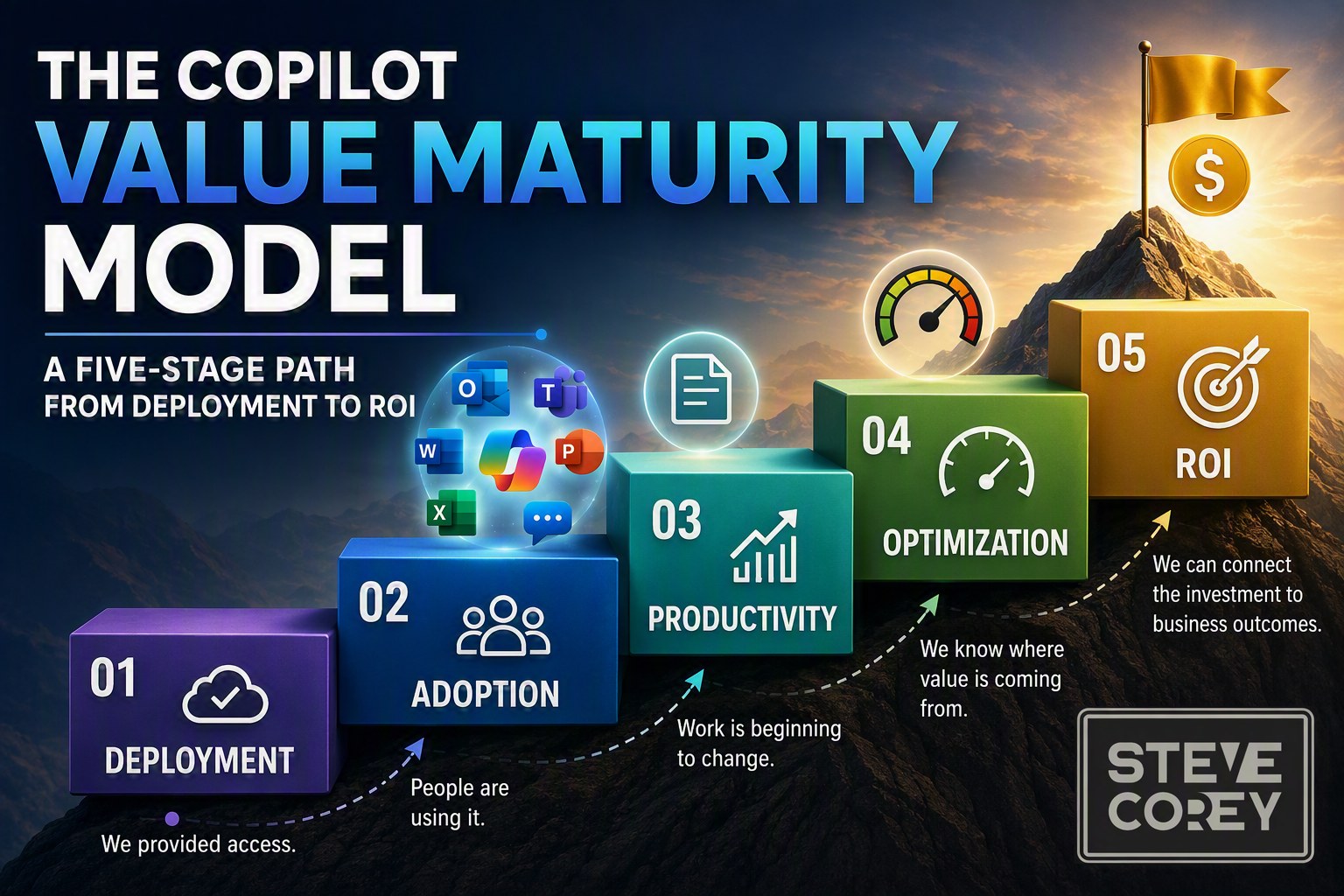
- Deployment: We provided access.
- Adoption: People are using it.
- Productivity: Work is beginning to change.
- Optimization: We know where value is coming from.
- ROI: We can connect the investment to business outcomes.
A license gets you onto the bottom step. Everything above it, you have to build.
A License Is Potential Energy
Think of a Copilot license as potential energy. You’ve made the investment and handed someone genuinely powerful capabilities. You may have finished the technical work, satisfied the governance reviews, and delivered training to a few thousand people. All of that matters, and none of it is wasted effort.
But the license itself tells you nothing about what happens next. It doesn’t tell you whether the employee opens Copilot, whether they come back to it a second time, whether it improves anything about how they work, or whether that improvement shows up somewhere the business actually cares about.
Microsoft’s own measurement framework separates readiness and adoption, productivity impact, and business value and ROI. Native reporting covers operational information for licenses and deployments, adoption insights by app and feature, and advanced analysis that can incorporate organizational metrics. That separation exists for a reason: each stage answers a different question.
- Can people use Copilot?
- Are people using Copilot?
- Is their work changing?
- Do we know where the strongest value is?
- Can we credibly explain the business impact?
Trying to answer all five with a single number is where most ROI conversations just go off the rails.
Level 1: Deployment
At the Deployment level, you’re building the foundation, and the work is genuinely substantial: technical readiness, license assignment, security and compliance, permissions and information access, data governance, rollout planning, communications, and executive sponsorship.
This work is crucial. If employees can’t get to Copilot, if the environment isn’t properly governed, or if nobody can explain why the organization is doing this at all, everything that follows becomes significantly harder.
Deployment is also attractive, because it produces visible milestones. Licenses are purchased. Configurations are completed. Users are enabled. Launch communications go out on schedule. There’s a satisfying sense of progress, and a real temptation to treat the deployment milestone as the value milestone.
Picture a sales organization that has just equipped its sellers with Copilot. At Level 1, the organization can say with confidence that the right people have access and that the technical and governance work is done. That’s a legitimate accomplishment and worth acknowledging. The thing is… it’s not evidence that proposals move faster, that customer follow-up improved, or that anyone gained an hour.
The road has been built. You still need people to drive on it.
The question that moves you forward: now that employees have access, are they using Copilot intentionally and repeatedly?
Sponsor
🔒 Sponsored by Afi — Smarter Cloud Backup & Recovery
Cloud platforms like Microsoft 365, Google Workspace, Azure, AWS, and Kubernetes are powerful — but they don’t always protect your data the way you think. Accidental deletions, ransomware, and compliance gaps can still cause serious disruptions.
That’s why I’ve partnered with Afi, a modern backup and recovery solution built for today’s multi-cloud environments. Afi offers full-fidelity restores, encrypted full-text search, version history, and even self-service recovery — so users can get their data back without waiting on IT.
Its AI-powered ransomware detection automatically triggers backups before damage is done, giving you peace of mind and keeping your business running smoothly.
Over 10,000 organizations trust Afi to protect their cloud data.
Learn more at afi.ai.
Level 2: Adoption
At the Adoption level, Copilot starts appearing in everyday work. Someone catches up on a Teams meeting they missed, summarizes a sprawling Outlook thread, gets a first draft started in Word, turns source material into a rough deck in PowerPoint, explores a workbook in Excel, or uses Copilot Chat to pull together context before a difficult conversation.
Measurement gets more interesting here. Microsoft’s native usage report separates enabled users from active users, where an active user is an enabled user who tried a user-initiated Copilot feature in one or more Microsoft 365 apps during the reporting period. The report also provides an active-user rate, prompt information, and adoption by app. That’s considerably more useful than counting assigned licenses, but it still doesn’t finish the story.
Consider two marketers. One uses Copilot once to rewrite a paragraph. The other uses it every Monday to turn scattered campaign notes into a structured briefing, then edits and refines the result before the team meeting. Both may show up as active users in the same report. Only one of them has built something that will still be there in six months.
Microsoft’s AI Adoption Score reinforces how much frequency matters. Its methodology uses a target of three active days per week, or 12 active days in a rolling 28-day period, and it counts intentional activity across Outlook, Teams, Copilot Chat, Word, PowerPoint, Excel, OneNote, and Loop.
That doesn’t mean you should chase activity for its own sake. More prompts are not automatically better prompts, and an organization that pushes for volume tends to get volume rather than value. What you’re really after is repeated, intentional usage attached to work people recognize.
The question that moves you forward: is Copilot generating activity, or becoming part of useful, repeatable workflows?
Level 3: Productivity
The move from Adoption to Productivity is subtle, and it shows up in how people talk. At Level 2, an employee says “I use Copilot.” At Level 3, they say “I use Copilot for this.” The second sentence is far more interesting, because it means something specific has taken hold.
Go back to the sales example. A seller starts using Copilot before customer meetings to review what’s already been discussed and work out which questions to ask. Afterward, they use it to draft the follow-up and rough out the starting point for a proposal. That seller isn’t experimenting with disconnected features anymore. Copilot has moved into a workflow.
At this level, the organization starts asking better questions. Does Copilot reduce effort on recurring tasks? Does it help people get started faster? Does it improve the quality of a first draft, or make meeting preparation and follow-up less painful? Do employees say certain work feels less repetitive? Are specific work patterns actually changing?
Microsoft’s Copilot impact report offers real help here, with active users, Copilot actions, assisted hours, and analysis across meetings, Teams chat, email, documents, and Copilot Chat, plus comparisons of collaboration patterns across groups. Those indicators can support a productivity story, but they need careful interpretation, because it’s easy to over-read them.
An estimated assisted hour is not an hour removed from payroll. A cheerful survey response is not a financial return. A large number of Copilot actions tells you people pressed the button, not that pressing it helped. Productivity evidence is valuable and worth collecting. It just isn’t the destination.
The question that moves you forward: which workflows are improving, for whom, and how consistently?
Level 4: Optimization
Optimization is where a Copilot program stops being a rollout and starts being a management discipline.
The organization is no longer satisfied with “Copilot adoption is increasing,” because leaders have realized that number is hiding all the interesting differences underneath it. Maybe meeting scenarios are catching on while an important document workflow hasn’t moved at all. Maybe one department has built genuinely repeatable use cases while another still treats Copilot as a novelty someone mentioned at an all-hands. Maybe a small group of enthusiasts is producing excellent examples that nobody outside their team has ever seen.
So the questions get sharper:
- Which roles and groups are building sustained habits?
- Which applications and scenarios are producing useful results?
- Where is adoption stalling or falling off?
- Which employees need more help, and what kind?
- Which use cases deserve more investment?
- Where should licenses be added, kept, or reconsidered?
- Are our training and communications actually changing behavior?
Microsoft provides several reporting options rather than one universal Copilot report, including Microsoft 365 admin center reports, Copilot Analytics through Viva Insights, Microsoft Purview audit logs, and analytics for Power Platform and Copilot Studio. Those experiences serve different needs, from license eligibility and adoption through custom analysis, compliance, and agent performance. The Microsoft 365 Copilot adoption report can help analysts examine organization-wide adoption and identify teams using Copilot frequently, with filters based on organizational attributes.
The challenge at Level 4 isn’t access to more charts. It’s building a repeatable process for interpreting what you’re seeing, deciding what to do about it, and checking whether the thing you did made any difference.
The question that moves you forward: can we use the evidence we already have to make better decisions about enablement, use cases, and investment?
Level 5: ROI
At Level 5, you finally reach the question the executives have been asking since the first budget conversation: what meaningful business impact is associated with this investment?
There’s no universal metric waiting at the end of this. The outcome depends entirely on the workflow. For a sales organization, the relevant measures might be proposal turnaround, meeting-preparation effort, or customer follow-up. A marketing team might care about content-cycle time or revision effort. An operations group might look at reporting effort, issue resolution, or how long process documentation takes. Those are examples, not a standard scorecard, and every organization has to decide for itself which outcomes matter.
Follow our seller through the whole model and you can see how the evidence accumulates. At Deployment, they get access. At Adoption, they use Copilot repeatedly across Outlook, Teams, and Word. At Productivity, meeting preparation and proposal development start to change. At Optimization, the organization works out which proposal scenarios benefit most and concentrates enablement there. At ROI, it compares those scenarios against business measures chosen in advance, while accounting for everything else that might have moved the number.
That last part is where credibility lives. Business outcomes rarely have a single cause. Seasonality, staffing, process changes, market conditions, training, and plain differences between roles all affect the result. A responsible ROI analysis doesn’t pretend otherwise; it makes the methodology and its limitations visible, because an analysis that survives scrutiny is worth more than one that impresses briefly and then falls apart in the follow-up meeting.
The objective isn’t a perfect number. It’s a credible value story assembled from several kinds of evidence and weighed against the real costs of licensing, enablement, administration, and change. That evidence usually includes adoption and retention, workflow changes, employee experience, productivity indicators, operational outcomes, relevant costs, and organizational context.
The continuing question: can we explain the value, the evidence behind it, and the limits of our analysis clearly enough to guide the next investment decision?
Maturity Isn’t a Straight Line
A maturity model is a useful simplification, and real organizations are gloriously messy. You might have excellent technical readiness, wildly uneven adoption, and one department already producing genuine evidence of business value. Your sales group could be circling Level 4 while another function has barely left Level 1.
That doesn’t break the model. The point was never to award your company one permanent score. Apply it to the whole Copilot program, or to a department, a role, or a single use case, and it will show you where progress is strong, where the value chain is weak, and what should happen next.
You can also move backward, which surprises people. Adoption fades after an enthusiastic launch. A useful scenario stops being relevant when a process changes. New capabilities arrive and bring fresh readiness and governance questions with them. Treat Copilot maturity as a living condition you review, not a certification you earn once and frame.
A Quick Copilot Maturity Check
Run through these questions and see where your honest answers start to thin out.
Level 1: Deployment
- Have technical, security, and governance requirements been addressed?
- Do the intended users have appropriate access?
- Did you define goals before or during rollout?
Level 2: Adoption
- Can you distinguish enabled users from active users?
- Can you examine frequency and adoption by app or organizational group?
- Are employees returning to Copilot for intentional work?
Level 3: Productivity
- Can employees name recurring tasks where Copilot helps them?
- Are specific workflows beginning to change?
- Do you consider employee experience alongside activity data?
Level 4: Optimization
- Can you identify your stronger and weaker scenarios?
- Do adoption insights actually influence training and communication?
- Are license and expansion decisions informed by evidence?
- Does leadership review Copilot value on a recurring basis?
Level 5: ROI
- Have important use cases been connected to relevant business measures?
- Were baselines or comparison approaches established?
- Can you explain your methodology and its limitations?
- Can leadership use the evidence to make an investment decision?
At which level can you answer “yes” consistently, rather than pointing at one enthusiastic team?
Moving Up Requires Better Measurement
Here’s a pattern worth noticing: the reporting you need at the start of a Copilot journey isn’t the reporting you need later.
Deployment teams begin with license assignments and active users, and that’s the right place to begin. As the program matures, the questions change shape. Which behaviors create value? Where does enablement need to go next? Is Copilot improving outcomes this organization actually cares about, and can we say so in a room full of skeptical finance people?
Those questions are organizational and contextual, not purely technical, and they tend to arrive faster than teams expect. This is the point where a category of purpose-built value-realization tooling becomes relevant, sitting alongside Microsoft’s platform and native analytics rather than replacing them.
For now, the more important point is the one the model is built around: you can’t manage what you haven’t separated.
The Model Is a Map, Not the Destination
The Copilot Value Maturity Model isn’t meant to make a messy transformation look tidy. It’s meant to help people have a better conversation than the one where four stakeholders talk past each other for an hour.
Deployment, adoption, productivity, optimization, and ROI are related. They are not interchangeable. If you’re measuring licenses, don’t call it adoption. If you’re measuring activity, don’t automatically call it productivity. And if you’re measuring estimated assistance, please don’t call it financial return, because the first person who checks that claim will find the seam.
Instead, work out which stage you’re actually measuring, identify the evidence you need to move forward, and strengthen the next link in the chain. A Copilot license creates potential. Repeated adoption turns that potential into changed behavior, better workflows create room for productivity, optimization concentrates your investment where it works, and disciplined measurement connects all of it to outcomes.
That’s how Copilot goes from something the organization owns to something the organization values.
The Rest of This Series
This article is the hub. Five more follow, one every week or so, and I’ll link each from here as it goes live:
- Assigned Is Not Adopted: How to Increase Microsoft 365 Copilot Usage - turning licenses into repeatable habits across Outlook, Teams, Word, PowerPoint, Excel, and Copilot Chat.
- Stop Teaching Copilot Features. Start Teaching Real Work. - scenario-based enablement, role-specific use cases, and a prompting approach people will actually use.
- Better Information Creates Better Copilot Results - why stale, duplicated, or overshared content quietly limits Copilot value.
- The Copilot Measurement Gap - what native reporting gives you, where the gap opens up, and how to run a value-realization practice.
- From Copilot Adoption to Measurable Value - the product story, and what responsible ROI measurement looks like in practice.
Next up: the transition where most Copilot programs first lose momentum. Assigning a license is easy. Changing a habit is hard, and the gap between those two facts is where the first ROI leak usually hides.